


Developer Noniv has released Abyssal Garden, a browser-based work that lets you swim freely among kelp forests and a sunken ship. Built with Claude Code, it runs from a single HTML file of about 97KB. The source code is public, along with the prompt used to create the initial version, so it is possible to trace the process from AI code generation through to implementation.
The file stays small because the scene is generated by code rather than supplied as separate image or 3D model assets. The roughly 180fps rendering performance reported by the author, however, comes with conditions such as the hardware and resolution used. A closer look at the public code reveals the process that generates the seabed and plants at startup, a mechanism that adjusts rendering load while running, and the quality and performance verification steps built into the initial prompt.
An Underwater World in About 97KB
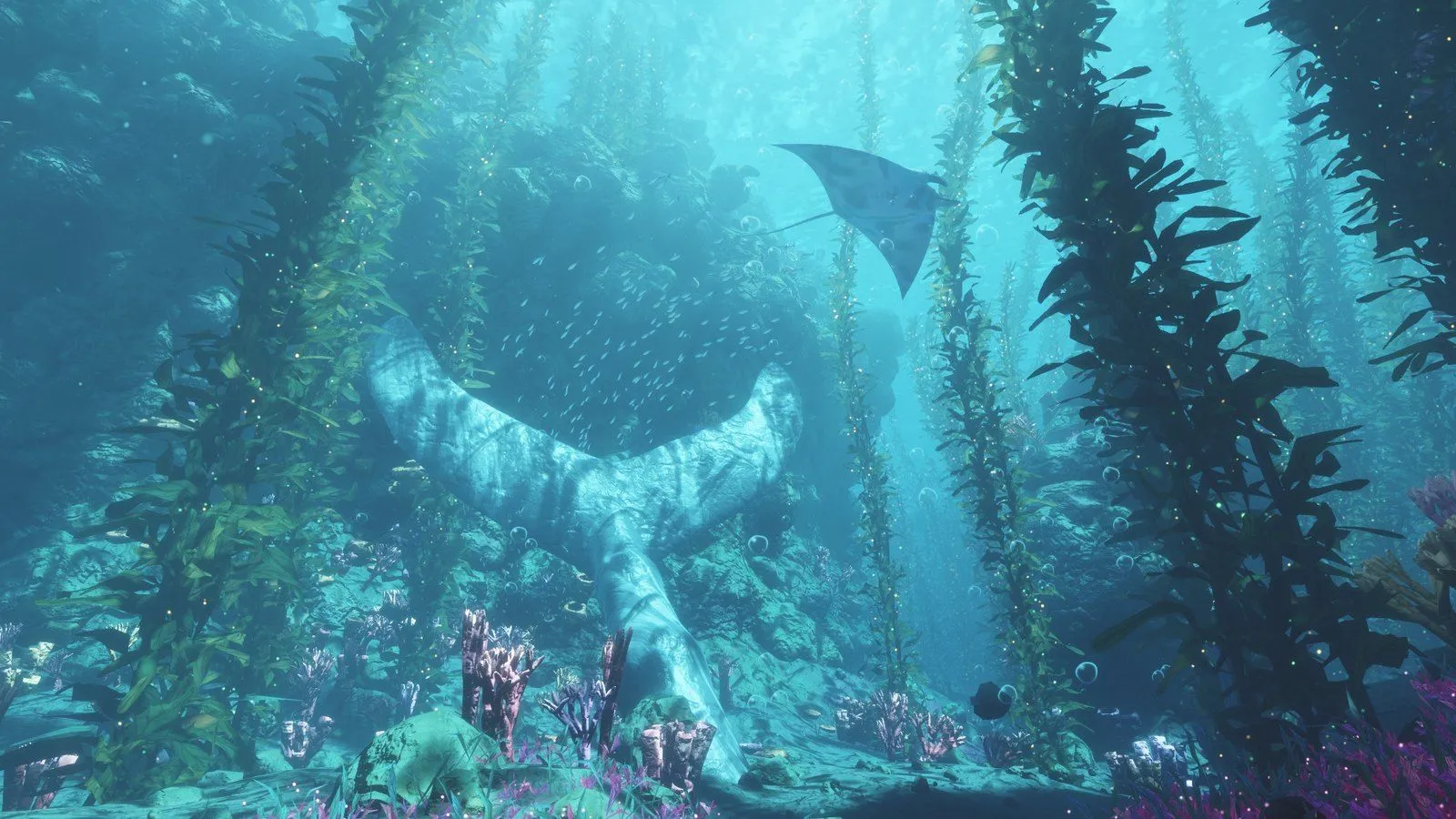
In the Abyssal Garden public demo, you swim over a seabed thick with swaying kelp and explore a sunken ship, a stone whale fluke, manta rays, schools of fish and more. Light filtering down from the surface and underwater ambient sound are also reproduced. According to the public GitHub repository, the project uses WebGPU, which lets the browser use the GPU, for rendering, and the Web Audio API for sound synthesis. It does not depend on a game engine or external 3D libraries.
On a PC, you can move and control the view with the keyboard and mouse, and the number keys switch between six preset viewpoints. The author recommends Chrome or Edge with WebGPU support. Touch controls are also supported, but they are positioned as an experimental feature.
As for file size, the author's Reddit post says 97KB, while the GitHub README says 96KB. The public demo's HTML file is 99,514 bytes (about 97.18KiB). It is unclear how much the difference in figures stems from versions or calculation methods.
How a Small HTML File Generates an Underwater World
Instead of distributing finished images and 3D models, Abyssal Garden distributes the code that generates them. The public build script combines multiple source files, then compresses WGSL (the WebGPU shader language), JavaScript and CSS and embeds them in a single HTML file. The browser runs the code it receives and assembles the underwater world on the user's own device.
The process falls into three broad stages. At distribution, the steps for generating the world are packed into the HTML. At startup, the seabed, plants and other elements are generated. During rendering, resolution and draw distance are adjusted to match the device's performance. Because each stage handles different work, HTML file size and runtime load need to be considered separately.
| Stage | Main role | Processing confirmed in public code | Technical point |
|---|---|---|---|
| Distribution | Packages the steps for generating the world | Compresses WGSL, JavaScript and CSS and combines them into a single HTML file (build script) | About 97KB refers to the size of the distributed file |
| Startup | Generates the seabed, plants and other elements | Computes seabed density data on the GPU, generates terrain shapes and element placement, and transfers them to the GPU (main.js, quality.js) | The number of generated elements varies with the initial quality setting |
| Rendering | Adjusts rendering load to the device | Changes rendering resolution and draw distance in steps, targeting 60fps (README) | Actual rendering performance varies with hardware, resolution and quality |
This summary is based on the public code and README. No independent measurements of startup time or runtime memory usage were made.
Looking closer at startup, main.js first uses GPU compute processing to calculate seabed density data and reads the result back to the CPU. It then generates terrain shapes and the placement of plants and other elements, and transfers vertex data and per-element information to GPU buffers. world.js contains the code that generates terrain and object placement at startup. After the transfer to the GPU, the design frees some of the temporary data used during generation.
According to the author's README, the seabed is populated with about 2 million kelp blades and plants, tens of thousands of rocks, and thousands of sponges, corals and fish. The sunken ship, whale fluke, manta rays and other objects are also built by combining simple mathematical shapes. The distributed file does not need to store large amounts of shape data, but the computation to generate them takes place at startup, and rendering uses GPU processing power and memory. The small file size of about 97KB therefore does not directly translate into lightness at runtime.
Sound is likewise generated by code rather than loaded from recorded files. In audio.js, audio processing with the Web Audio API starts on the first click, key press or touch. It synthesizes low rumbles, water currents, bubbles, distant whale calls and more, updating them on a 10Hz timer independent of the video rendering loop.
About 180fps, and Quality Adjustment to Fit the Device
The rendering performance the author reports in the README is about 180fps at 2560×1440 on an NVIDIA GeForce RTX 5070 Ti. On a Samsung Galaxy A16, by contrast, it reportedly ran at about 20fps on Low quality at a resolution of 670×372. Because the conditions differ not only in GPU performance but also in resolution and quality, these figures cannot be compared directly.
Abyssal Garden offers three quality levels: High, Medium and Low. Medium halves the number of kelp blades, light particles, pebbles and similar elements, and omits shadows for small rocks, sponges and corals. Low cuts the number of blades and similar elements to a quarter, disables anti-aliasing, which smooths jagged edges, and simplifies the shapes of rocks and corals as well as the lighting. In other words, the quality setting changes the level of detail of the world generated at startup.
While running, the program also automatically adjusts rendering load to target 60fps. In the public code, it first lowers the rendering resolution, then shortens the draw distance for plants and rocks, and lowers the resolution further if the load is still high. The scene is also rendered in the background while the start menu is displayed, so adjustment begins before you actually start swimming.
Settings such as quality, resolution and draw distance are saved in the browser and carried over to the next launch. If a load is judged to have ended abnormally, the code also lowers the quality by one level on the next launch. The design combines optimizations at different stages: the initial quality setting determines the density of generated objects, while runtime adjustment changes the rendered range and resolution.
Quality and Performance Checks Built into the First Prompt
According to Noniv, the initial version of Abyssal Garden came from a single instruction to Claude Code. Additional instructions then added features such as the start menu, rock collision detection and the three quality levels. The Reddit post names "Fable 5.2" as the AI model used.
The contents of the initial prompt published on GitHub are particularly interesting. The instructions set clear development priorities: visual quality first, frame-time stability on the specified hardware second, and file size third. The small size of about 97KB is one of the results, but minimizing file size was not the top priority from the start.
Performance targets are also specified concretely. The target environment is Windows 11 25H2, Chrome 157, an RTX 5070 Ti, a Ryzen 7 7800X3D and a 180Hz monitor, running at full 2560×1440 resolution. In a standardized 60-second camera movement test, the average GPU frame time must be kept to 11 milliseconds or less, and no frame may exceed 16.7 milliseconds. These are targets set in the initial prompt and are a separate metric from the roughly 180fps the author reports in the README.
Procedures for checking visual quality were also built in from the start. Claude Code was instructed to prepare a separate sub-agent that evaluates only the rendered output, without seeing the generated code or reasoning. This sub-agent is given images from six fixed viewpoints captured at 2560×1440, along with a recording of a short camera movement. It checks for flicker, jagged edges, objects popping into view and unnatural color banding, and the design calls for repeated fixes until no defects beyond minor ones remain.
For performance verification, the prompt asks for GPU timestamp queries and frame-time logs from the standardized camera movement test, with the average, 99th percentile and maximum reported. The 99th percentile is the boundary below which 99% of measured frame times fall when sorted from shortest to longest. It is a metric for identifying slow moments that an average alone can hide.
The README also explains that the developer-oriented dev.html includes a one-minute standardized camera movement and a benchmark feature that measures frame time and GPU processing time. This feature is not included in the publicly available index.html, and becomes available when a development build is generated from the source code.
However, the public materials we could review do not include final performance measurement logs showing that the conditions specified in the initial prompt were met, nor the final report from the sub-agent responsible for visual evaluation. What the published instructions do show is that the author asked the AI not only to write the code but also specified how to verify visual quality and rendering performance. Abyssal Garden is a case where the instructions, the implementation code and a working demo can all be checked against one another.