

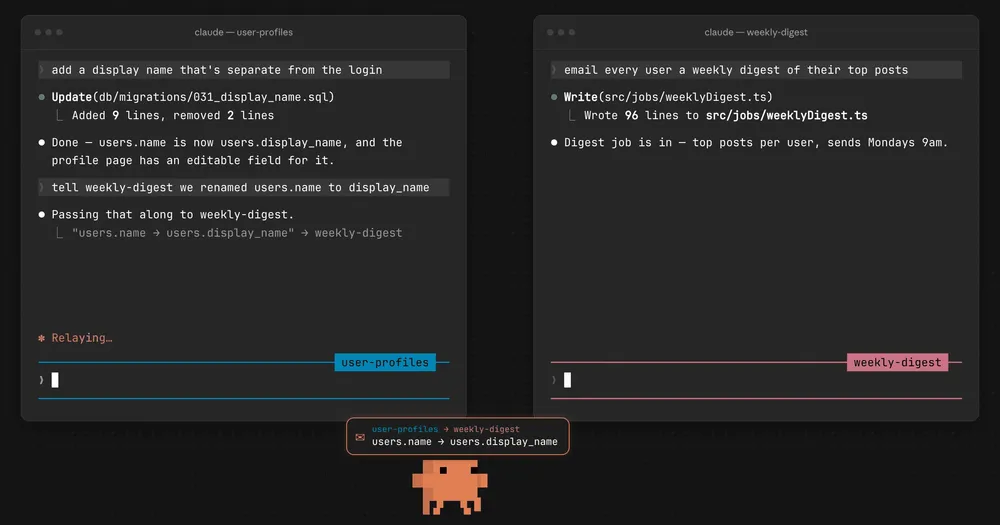
Anthropic has added "cross-session messaging," which lets independent Claude Code sessions send text to one another. Starting with v2.1.224, released on August 7, 2026, separate instances of Claude running in different terminals or worktrees can find each other and pass along insights or decisions made during their work. What was previously a manual task—copying information between terminals—is now something Claude itself can handle. That said, only text is shared; conversation history, files, and operating permissions do not transfer to the other party.
Independent sessions discover each other starting in v2.1.224
The new feature is built on ListAgents, which searches for reachable peers, and SendMessage, which sends text to a named recipient. Users don't need to operate these two tools directly. If you ask, "Let the frontend session know about the API change," Claude identifies the destination and composes the necessary message itself. If Claude notices a change that affects work happening in another session, it may reach out proactively.
The intended use case is parallel development across multiple worktrees of the same repository. If one session discovers a breaking API change, it can proactively notify another session working on dependent implementation. It's also useful for reporting progress from a session running a long migration or test suite back to a session that's monitoring it. Likewise, a session waiting on a decision can be notified once another session has an answer.
If the receiving session is busy, the message is read at a break between tool calls—it doesn't interrupt a command that's currently running. If the receiving session is idle, the message starts a new turn. This design allows parallel work to continue uninterrupted while ensuring messages don't forcibly interrupt processing whenever they arrive.
What's shared is text, not history
Communication on the same machine goes through a receiving socket created for each session. Claude Code writes session registration information to disk and restricts the receiving socket to the OS user. Local messages never pass through Anthropic's servers. Because two sessions need access to the same registration file to find each other, a session on the host and one inside a separate container cannot discover each other. Two sessions running inside the same container, however, can communicate.
The communication path and what can be sent depend on where the other party is located.
| Peer location | Communication path | What the local side can do |
|---|---|---|
| Same machine | Per-session socket | Send new messages and replies |
| Another of your own machines | Through Anthropic's servers via Remote Control | Reply to messages received from the peer |
| Claude Code on the web | Through Anthropic's servers | Reply to messages received from the web side |
Remote communication is not a complete extension of local communication. The local side cannot initiate a new conversation with a session on another machine or on the web—it can only serve as a one-way starting point for replying to a message received from the peer. Replies can still be sent even without a Remote Control connection, but in that case no reply-routing information is attached, so the recipient cannot send a further response back.
Only text written by the sending Claude is included in a message. The sender's conversation history and working files are not passed along. If you want to continue the same conversation in a different terminal, use session resume; if you want to share files, use a repository or worktree that both sides can access. Also note that received messages count toward usage just like prompts typed by the user—more messaging means more context and token consumption.
Where it differs from subagents and Agent Teams
Claude Code already offers several ways to use multiple processing entities. Even with cross-session messaging added, each has a distinct role.
| Feature | Who starts the unit of work | Context and coordination method | Best suited for |
|---|---|---|---|
| resume | User | Resumes an existing conversation | Continuing the same job from a different terminal |
| Subagent | Parent session | Works in an isolated context and returns results to the parent | Delegating research or verification while preserving the parent's context |
| Agent Teams | Lead Claude | Each teammate has an isolated context and coordinates via a shared task list | Letting Claude spawn and supervise multiple contributors |
| Cross-session messaging | User launches and operates sessions separately | Sends necessary text between sessions | Connecting human-supervised parallel work partway through |
The strength of cross-session messaging lies in loosely connecting independent sessions without creating a central lead or shared task list. Users can keep each session's purpose and permissions defined separately, while still passing along insights whenever a dependency arises. On the other hand, if you want to hand off work allocation and completion tracking to Claude itself, Agent Teams is the better fit. Agent Teams is an experimental feature that gives each teammate a separate context window, so token usage increases with the number of active teammates.
A subagent is a mechanism for finishing work spun off from a parent session and reporting the key points back to that parent—it is not a coordinator for multiple independently human-operated sessions. What the new feature fills in is the missing communication path between sessions that users are already running in parallel.
Conditions to check before adoption
A message arriving from another session is not treated as an instruction or approval from the user themselves. The receiving Claude processes it knowing it came from another session. The sender cannot approve permission requests, nor can it instruct the receiver to change its settings or CLAUDE.md. Even if a command like /compact is written in the message, it arrives as plain text and is not executed. If handling the message requires file edits or external connections, the receiving session's permission rules apply as usual.
The inbound setting crossSessionInbound has three values: accept, hold, and refuse. Even without an explicit setting, whether a message is delivered immediately or held depends on the sender's and receiver's permission modes. Held messages are capped at 100, and the default approval-dialog timeout is 5 minutes. Organizations that want to always confirm messages leaving the machine can enable isolatePeerMachines. To block incoming messages entirely, use refuse; to block sending and retrieving the peer list, use deny rules for SendMessage and ListAgents.
There are also environment requirements. Support is limited to macOS and Linux on v2.1.224 or later, including Linux under WSL 2. It is not available on native Windows. Amazon Bedrock, Claude Platform on AWS, Google Cloud Agent Platform, and Microsoft Foundry are also not supported. The feature also won't work in environments where certain environment variables that disable non-essential communication or telemetry cause the underlying feature flag evaluation to be disabled.
Long-running claude -p sessions normally have a receiving socket as well, but they are not registered in bare mode. Because non-interactive sessions cannot display an approval dialog for held messages, unattended setups that need to receive messages must explicitly set crossSessionInbound=accept. With this setting, incoming messages are processed immediately, becoming a new input path for automated processing. When adopting this feature, you should decide, session by session, whether they share the same filesystem, which permission mode they'll receive messages under, and what actions you'll allow after a message is received.