


Recent reports have documented two developments in ClickFix attacks: delivery through compromised websites is spreading, and the place where users are tricked into running code is shifting. On September 3, 2026, Netskope reported observing more than 5,400 compromised websites connecting to the same blockchain infrastructure, and on September 8, Cisco Talos reported a variant that steals cryptocurrency inside the browser. In every case, users who trust a fake verification or repair procedure end up carrying out the attack themselves, but the damage that follows differs, ranging from intrusion into the device to rewriting the destination of a transfer. Why have these attacks become easier to launch, and which parts of a defense need rethinking when the place of execution changes?
What looks like verification becomes program execution
"Verify that you are human." The typical ClickFix attack begins by posing as a familiar check like this. A fake CAPTCHA or a screen imitating Cloudflare is overlaid on a compromised site, and when the user interacts with it, a malicious command is copied to the clipboard. The user is then prompted to open the Windows Run dialog or a terminal, paste the command, and execute it. The TerminalFix campaign analyzed by Microsoft used this same flow.
The user's goal is to keep viewing the site, but partway through the task switches to running a program on their device. The trick is to use a verification step that should be completed entirely within a web page as a pretext for bringing a command into a different application. A Cloudflare logo or a completion message does not guarantee that the command is legitimate.
Nor is the lure always an obviously fake site. In its September 2 warning, New Zealand's National Cyber Security Centre (NCSC) addressed distribution through compromised WordPress sites and others. Having opened the correct URL is a separate matter from whether you can trust the instructions displayed there.
In an article on September 11, Dan Goodin of Ars Technica suggested that users accustomed to cumbersome verification and web procedures are more likely to follow even puzzling instructions. This is the author's commentary, not the result of measuring the causes of infection. Even so, explaining the damage solely as user carelessness overlooks how attackers exploit familiar screens and sites people already trusted.
Compromised sites and distribution that needs no signature
In research published on September 3, Netskope found that over the observation period of the past few months, more than 5,400 compromised sites connected to the BNB Smart Chain (BSC) testnet, affecting more than 2,200 organizations worldwide. Most of the sites examined individually were built on WordPress, and some on PrestaShop, but how they were initially breached is unknown.
This figure shows how widely the sites used to deliver the attack spread. It is neither the number of infected PCs and Macs nor the share of visitors who followed the instructions. The same research also included a variant that communicates over WebRTC instead of showing a ClickFix screen, so it does not mean the same infection succeeded on every site.
The delivery mechanism works like this: a short script embedded in the site loads the next piece of code from a smart contract on the blockchain. By updating the contract, attackers can change what many sites deliver all at once. On a development testnet there is no need to pay in currency of real value, and Netskope points out that this lets attackers use a hard-to-remove delivery infrastructure at low cost.
Other research shows how the burden of preparing an entry point has changed. In its June 16 Lorem Ipsum analysis, BlueVoyant reported that an attack that had been distributing a fake Microsoft Teams installer moved to ClickFix at the end of May. It previously relied on signed payloads and fake download sites, but the new entry point was a fake browser-update screen on compromised sites.
The company assesses with high confidence that Microsoft's May 19 action against a fraudulent signing service prompted the shift. Even after losing its supply of signed installers, an attacker can move to a method that has users execute commands. The people being lured also broaden, from those searching for Teams to anyone who visits a compromised site.
This does not measure the costs or prevalence across all attackers. Still, an infrastructure that can update delivery code in bulk and an entry point that does not depend on signed payloads are connected as conditions that make ClickFix easier to spread.
Where the code runs changes the damage
In TerminalFix, which Microsoft analyzed in late August, users were guided to Windows Terminal or PowerShell, and a program that relays communications into the organization's network was even installed. In Talos's September case, by contrast, the place where code runs moved into the browser. ClickFix should be understood not as a particular piece of malware but as a technique for luring users into execution.
| Research and publication date | Where users are made to run it / pretext | Observed behavior | Points not to misread |
|---|---|---|---|
| Microsoft / late August 2026 | Windows Terminal or PowerShell / fake verification | Reconnaissance inside the organization and installation of a function that relays external communications | Follow-on activity such as ransomware deployment was not observed in the analysis |
| Microsoft / May 6, 2026 | macOS Terminal / fake repairs such as storage optimization | Theft of credentials and more; in some cases tampering with wallet apps and persistence | The verification path differs from launching an app from Finder |
| Cisco Talos / September 8, 2026 | Chrome address bar or Tampermonkey / fictitious method of making profit | Rewrites transfer destinations in the browser and adds fake bonus displays | Not a report of OS infection; a case targeting specific cryptocurrency users |
Sources: Microsoft's TerminalFix analysis and macOS analysis, and Cisco Talos research. The table compares separate attack cases by execution location; it does not rank infection rates or danger levels.
Separating Windows Terminal, macOS Terminal, and in-browser execution reveals the differences in defense and damage. On Windows, the heavier concern is that an affected device can become a relay point into the corporate network. TerminalFix makes a legitimate program load a malicious DLL and extracts an additional program hidden in a PNG image. It then explores Active Directory, which manages an organization's devices and accounts, and creates a "reverse communication tunnel" in which the device connects outward. Microsoft states that it observed no follow-on lateral movement or ransomware deployment in the sequence it analyzed, but this is a capability dangerous enough that inspecting only the infected device is not sufficient.
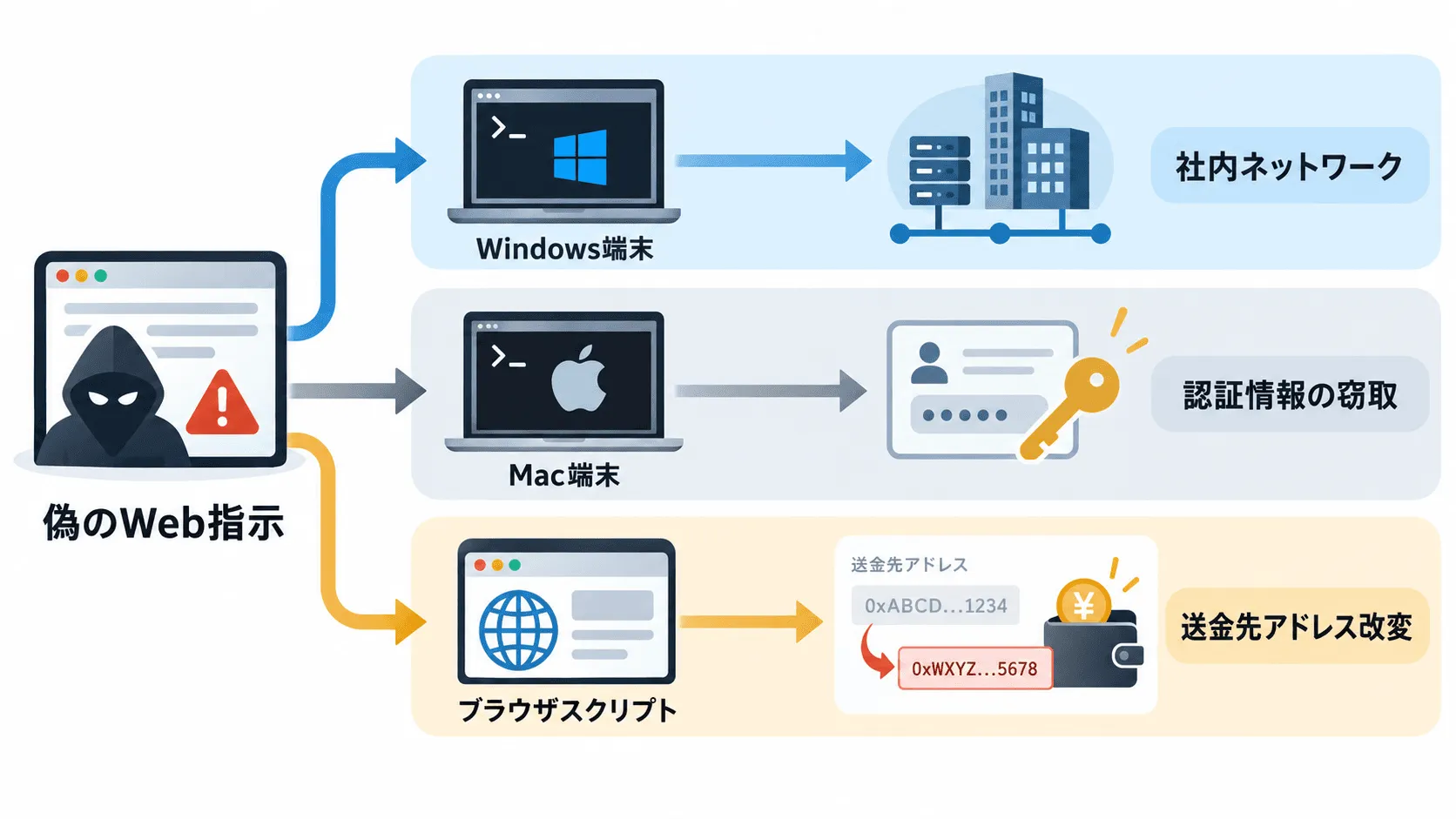
On the Mac, it is easy to misjudge when app verification applies. According to Microsoft's May analysis, an app opened in Finder and a script fetched and run directly from Terminal do not receive the same Gatekeeper evaluation. By moving from the traditional method of installing apps from disk images to running scripts with standard tools, attackers reduced their dependence on ordinary app distribution. This does not mean Gatekeeper as a whole was disabled. Lure pages written in Japanese have also been confirmed.
In the cryptocurrency theft Talos analyzed, victims were lured with the promise of profiting from a flaw in a nonexistent API and made to install JavaScript. The code is fetched from a public Google Sheets document and rewrites transfer destinations on trading screens and addresses on the clipboard. In a version going through the legitimate extension Tampermonkey, it also runs each time the user returns to the targeted site. Google and the extension itself were not compromised; malicious code the user brought in used legitimate services for delivery and execution.
Blocking only a specific Windows shortcut therefore does not reach the Mac or in-browser paths. The shared decision point is less about what the user is made to open than about what code of unverified origin is allowed to do.
Paste warnings, and the responsibility that remains with sites
As countermeasures against TerminalFix, Microsoft cites Windows Terminal's multi-line paste warning and restricting execution paths that are unnecessary for business. Progress is being made on the Mac too: in a March 31 technical analysis, security researcher Patrick Wardle confirmed functionality related to paste protection in XProtect in macOS 26.4.
However, a multi-line warning does not guarantee a command is safe, and paste protection in Terminal does not uniformly prevent code execution inside the browser. If you are asked to run an unfamiliar command for reasons such as verification, updates, or fixing low storage, stop, and check official guidance that you reached independently. Even if the command is already copied, do not run it to see what it does.
If you have already run a suspicious instruction, you cannot assume the problem is solved by closing the screen. The NCSC advises users who encountered the lure to run a security scan on the device, change passwords, and check for signs of compromise. On a work device, telling the administrator what you ran is the starting point for the investigation.
Work also remains for site operators. The NCSC calls for removing not only the fake verification display but also the initial intrusion route and any mechanism that could lead to reinfection. In addition to updating WordPress itself and removing unneeded plugins, this means reviewing administrative privileges and monitoring for file changes. Because some variants show a normal page only to scanners, a single automated scan finding nothing is not sufficient evidence of recovery either.
In evaluating countermeasures, it is necessary to confirm not only that the fake screen has disappeared, but also that the paths by which users run malicious code elsewhere, and the causes that let the site be compromised again, have been cut off.