


On October 29, 2026, Microsoft announced that Microsoft Edge now supports a new Windows feature called Accelerated App Launch. When a user opens Edge from the taskbar or clicks a link in another app, Windows sends a notification directly to an Edge process that is already running, reducing the work needed to launch. According to Microsoft, Edge is the first browser to support the feature.
According to the announcement on the Microsoft Edge Blog, launch speed improves by 15% in typical use and by up to 33% in heavily loaded environments where multiple apps are running at once. However, these figures compare launches with an Edge process already running, with and without Accelerated App Launch. The speedup applies to "warm launches" that reuse an existing process, not to "cold launches" that start the browser from a fully closed state. Microsoft has also not published the absolute launch times or detailed measurement conditions.
Using the feature requires Microsoft Edge version 150 or later, plus a compatible Windows 11 update released on October 28, 2026. The update to install differs depending on the Windows 11 version, so simply updating Edge is not enough. This article covers how the speedup works, the conditions behind Microsoft's published performance gains, the Windows updates required, and the constraints of the developer API.
How "Direct Notification" Skips the Intermediary Process
Microsoft Edge can run in the background even when no browser window is visible. For example, if the "Startup Boost" feature (described below) is enabled, Edge's core processes can be started before the user opens the browser. When the user then tries to open Edge again, it uses the existing process to display a new window or tab.
In previous versions of Windows, relaunching an app that was already running first required starting an intermediary process. That process searched for the existing app and, if it found a running instance, passed along information such as the launch request or URL. In other words, even when the app itself was already in memory, a temporary process had to be created and the existing process had to be located just to deliver the request.
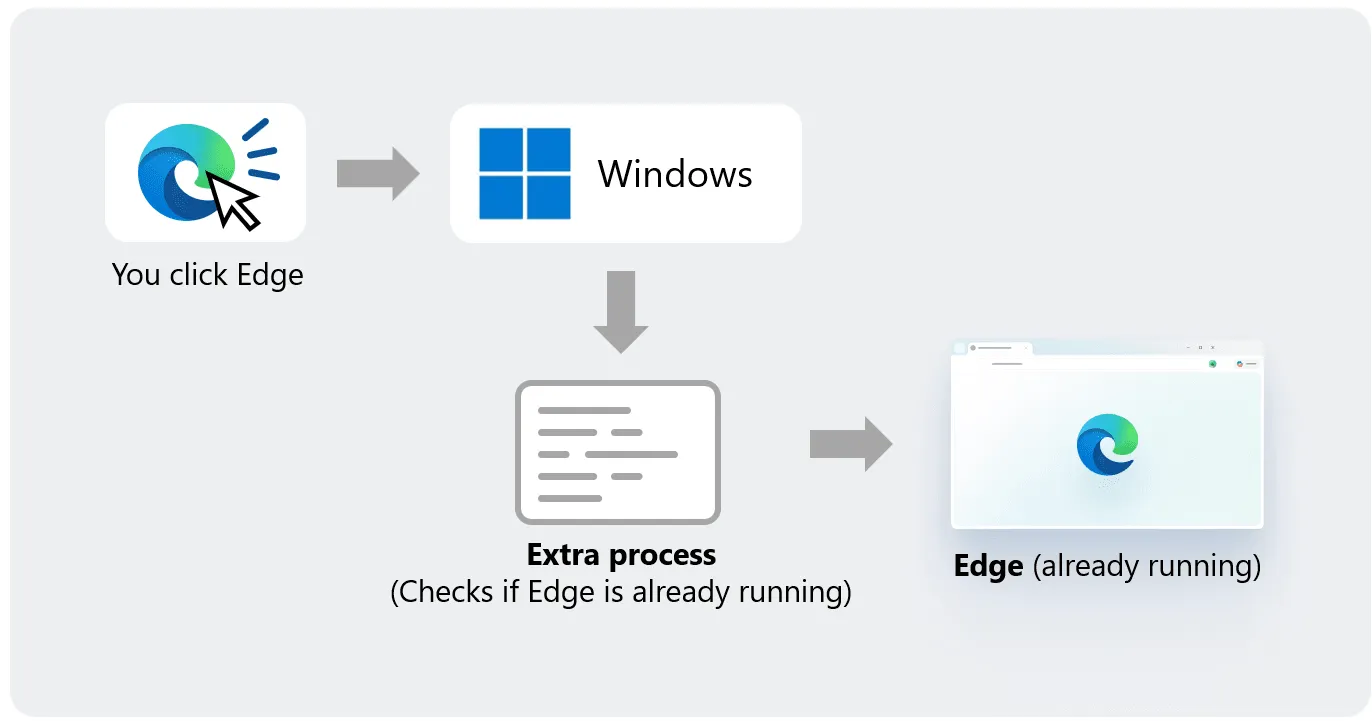
Accelerated App Launch removes the need for this intermediary process. When Edge first starts, it registers with Windows as the recipient of launch requests. Windows validates and accepts the registration, and the next time an Edge launch request occurs, it uses the stored registration information to notify the existing Edge process directly. This eliminates the work of creating an intermediary process and searching for the existing one.
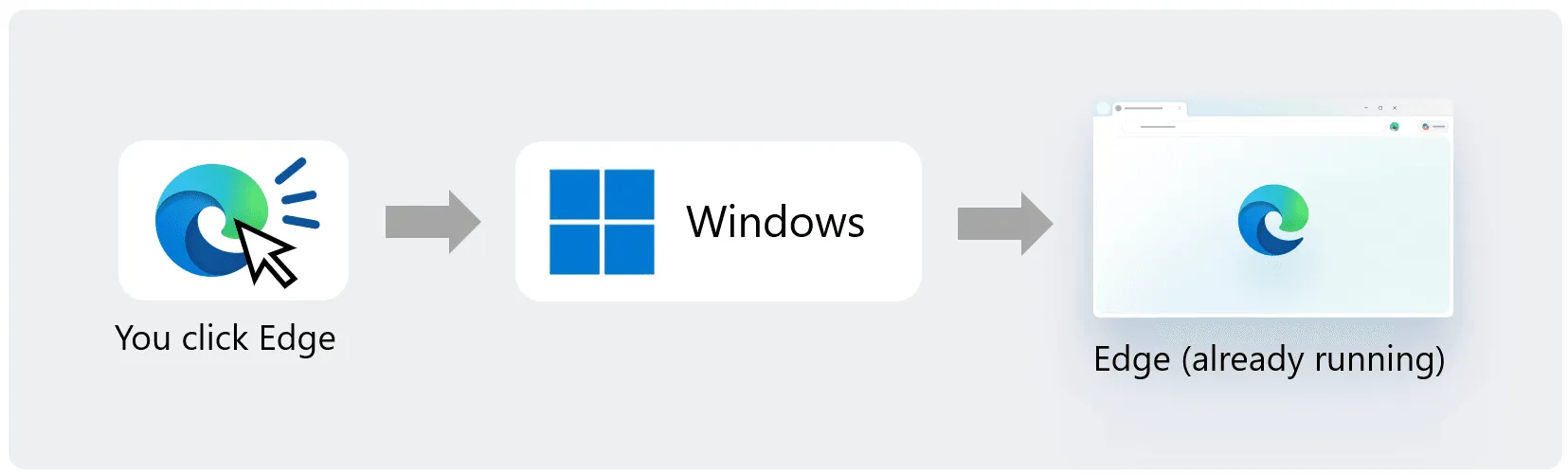
Microsoft says the mechanism is especially effective in heavily loaded environments where multiple applications are running. When the system has headroom, such as just after the PC boots, the time spent on the intermediary process may barely be noticeable. But when CPU and memory are consumed by many applications, creating a new process can contribute to launch delay. This change reduces that processing load on the Windows side.
The improvement rates published by Microsoft are as follows.
| Measurement condition | Launch speed improvement published by Microsoft |
|---|---|
| Typical usage environment | 15% |
| Heavy multitasking environment | Up to 33% |
These figures compare against the conventional launch method that does not use Accelerated App Launch, with the Edge process already running. They do not mean the browser's own processing speed or web page loading speed improves by 15–33%, nor do they represent faster cold launches that load the executable from storage. Because Microsoft has not given absolute launch times, it is impossible to tell from the published figures alone how many milliseconds were actually saved.
Published Gains and Required Windows Updates
The "15%" and "up to 33%" figures should be read with their measurement conditions in mind. A footnote in Microsoft's announcement states that the comparison is against a Windows environment that does not use Accelerated App Launch, with Edge already running. However, the CPU, memory capacity, storage type, number of trials, and the start and end points of the launch-time measurement are not disclosed. It is also unclear what level of load "heavy multitasking" refers to.
For now, the improvement rates are best treated as the developer's own measurement results. They do not guarantee the same improvement on every Windows PC, and the effect likely varies with processing load and the apps running in the background. Third-party measurements will be needed to determine how much difference users actually notice.
Using the speedup also requires that both Edge and Windows support it. According to Microsoft's Windows update history, the update released on October 28, 2026 includes support for Accelerated App Launch. However, Windows 11 versions 25H2/26H2 and 26H1 each require a different update.
| Target | Required version / update | Status and notes |
|---|---|---|
| Microsoft Edge | Version 150 or later | Edge 150 stable was released on July 2, 2026 |
| Windows 11 25H2/26H2 | KB5127936 (October 28, 2026) | Optional non-security preview update |
| Windows 11 26H1 | KB5127653 (October 28, 2026) | Preview update specific to 26H1 |
| Windows 10 | Not supported | This speedup is for Windows 11 |
| Edge operating state | An existing Edge process must be running | Launch from the foreground or background is assumed |
Edge 150, the browser-side requirement, has been available for several months. According to the Microsoft release schedule, the Edge 150 stable release (150.0.4078.48) was published on July 2, 2026. Environments where Edge is updated regularly therefore probably already meet the browser-side version requirement.
For Windows 11 versions 25H2 and 26H2, the supporting update is KB5127936, released on October 28. In Microsoft's support documentation, Accelerated App Launch is classified as a "Normal rollout." Unlike features that expand to users gradually, it is provided broadly to eligible environments that have installed the corresponding update.
For Windows 11 version 26H1, the same feature is added by a dedicated update, KB5127653. The Microsoft Edge Blog cites KB5127936 or later as the representative update, but for 26H1 the relevant one is KB5127653. Users need to check their Windows version and update history in Settings to confirm that the update for their environment has been applied.
These are currently offered as optional preview updates. They can be installed from "Optional updates" in Windows Update's advanced options, and for Windows Update for Business in enterprise environments, the change is said to be included in the next security update. Therefore, even if Edge is on a supported version, the speedup will not take effect if the Windows update has not been applied.
A Different Speedup From "Startup Boost": When Does It Work?
It is important not to confuse Accelerated App Launch with Edge's existing "Startup Boost." Both speed up browser launch, but they improve different processes.
Startup Boost starts Edge's core processes in the background so that users wait less when they open the browser. According to Microsoft's group policy documentation for "StartupBoostEnabled", this feature starts Edge processes when the user signs in to the OS and allows them to restart in the background after the last browser window is closed. In other words, the aim is to have the necessary processes ready in memory before the user next opens the browser.
Accelerated App Launch, by contrast, improves how Windows delivers a launch request to a process that is already running. If Startup Boost prepares the process in advance, Accelerated App Launch shortens the work of handing the launch request to that process. The two can be used together, but enabling Startup Boost is not required to use Accelerated App Launch.
For example, suppose you are browsing a web page in Edge and open a link from a mail app. Because an Edge process is already running, Windows can send the URL launch request directly to the existing Edge without creating a new intermediary process. Likewise, even if the browser window is closed, Edge running in the background thanks to Startup Boost can still be eligible for the speedup.
However, Accelerated App Launch does not work for every launch path. Microsoft officially specifies support for launches from the Start menu, the taskbar, and compatible links opened while Edge is set as the default browser.
| Launch scenario | Conventional processing | With Accelerated App Launch | Notes |
|---|---|---|---|
| Opening Edge from the Start menu | An intermediary process searches for the existing Edge and hands off the request | Windows notifies the existing process directly | Edge must be running |
| Opening Edge from the taskbar | The existing instance is called via an intermediary process | Registered process is notified directly | Requires supported Windows 11 and Edge |
| Opening a link with Edge as the default browser | The launch request is forwarded to the existing Edge via an intermediary process | Windows notifies the target window handle directly | Limited to supported URI schemes |
| Launching from a fully closed Edge | A new process is created | Conventional new-process creation is still performed | Not covered by this speedup |
Developer documentation also states that Accelerated App Launch does not cover every launch method. The same speedup is not necessarily applied to launches through desktop shortcuts, launches with special command-line arguments, or launches through external launchers. For launch paths that are not supported, the conventional process of forwarding the request to the existing process is still required.
This change also does not improve web page rendering or JavaScript execution speed. What gets faster is the processing until Windows delivers the launch request to the existing Edge process. The difference may be hard to feel when CPU load is low, while the benefit of skipping unnecessary process creation is likely larger in environments running many applications.
Developer API Constraints and Implementation Burden
Accelerated App Launch was not designed solely for Edge. Microsoft has published developer documentation, "Register your application for accelerated warm launches," so that other Windows applications can use it. However, the API is not a public interface available to anyone without conditions; it is treated as a "Limited Access Feature."
To build the feature into their apps, outside developers must apply to Microsoft for use and obtain an unlock token. Even once the API is available, it does not fully replace existing single-instance handling. Microsoft states explicitly that Accelerated App Launch does not support every Windows version or launch path, so developers must maintain their conventional launch processing.
Single-instance handling is the mechanism by which an application reuses an existing process when needed, even if the user launches it repeatedly. In environments where Accelerated App Launch is unavailable, the process that receives the new launch request must still hand off the work to the existing instance, as before. Developers therefore have to manage both the path that supports the speedup and the path that falls back to conventional launch processing.
There are also conditions for speeding up launches that use URI schemes. Even if an application has registered a particular URI scheme, it is not eligible for Accelerated App Launch unless it is set as the default handler for that scheme. This is because Windows sends direct notifications only to the process it has actually selected as the app to open that link.
Technically, Accelerated App Launch uses the Win32 window messaging mechanism that Windows has long had. At registration, the application passes Windows the window handle (HWND) that will receive notifications. Windows uses that registration information to deliver the launch request directly to the target window within the existing process.
The registration itself uses the IExperimentalAPIInvoker interface. This interface is implemented by CLSID_ExperimentalAPIInvoker, and registration methods are called by passing named properties. Accelerated App Launch provides two main registration methods:
RegisterAcceleratedTileLaunch: Receives launch requests from the Start menu or taskbar as a specified window message.RegisterAcceleratedUriLaunch: Receives launch requests via URI schemes as aWM_COPYDATAmessage.
For tile launches, the application receives notifications using the message ID it specifies. For URI launches, the WM_COPYDATA message, long used for interprocess communication on Windows, is used. The URI string is passed to the target HWND as a null-terminated UTF-16 string and handled by the application.
The differences in implementation can be summarized as follows.
| Comparison item | Conventional single-instance launch | Accelerated App Launch |
|---|---|---|
| Delivering the launch request | Create an intermediary process, search for the existing process, and hand off | Windows notifies the registered process directly |
| Communication method | Named pipes, shared memory, app-specific communication, etc. | Window message addressed to an HWND |
| Receiving URIs | Forwarding logic implemented by the app | WM_COPYDATA |
| Start menu / taskbar launch | Conventional launch and forwarding processing | Window message specified at registration |
| API usage restrictions | Can be implemented with ordinary Windows APIs | Application to use the Limited Access Feature required |
| Keeping conventional processing | Required | Still required for unsupported environments and launch paths |
| Target OS | Can support a wide range of Windows environments depending on implementation | Requires a compatible Windows 11 update |
Using the API also requires attention to the lifecycle of the registration object. RegisterAcceleratedUriLaunch and RegisterAcceleratedTileLaunch can each be called only once on the same IExperimentalAPIInvoker object. After registration, the object must be retained, and the same object used for registration must also be used to unregister.
In the sample code Microsoft published, a dedicated window is created to receive notifications. The helper object that does this must be created on a thread with an active message loop. In a WinUI app, for example, the UI thread can be used. This is because if the receiving thread cannot process messages, it cannot respond to the launch request even when the notification arrives.
In this way, what Accelerated App Launch takes over is mainly the creation of the intermediary process and the forwarding of requests to the existing process. Processing after the notification is received remains the application's responsibility. If creating a new tab, showing a window, or handling the received URL is heavy, the delay Windows has cut could be buried by that later processing.
For developers, the challenge is having to maintain existing launch processing while adding a new accelerated path. They also need to apply for the limited API, determine supported OS versions, and manage registration objects and message reception. Simply calling the API does not speed up launch; the implementation must take the application's entire launch process into account.
Contributing to Chromium and Questions Still to Be Tested
In this announcement, Microsoft also said it plans to broaden the scope of Accelerated App Launch. One example it cited is speeding up the opening of PDF files. The current implementation mainly covers launches from the Start menu, the taskbar, and supported URI schemes, but Microsoft is working with the Windows team so that the same mechanism can be used when opening PDF files.
However, faster PDF opening is currently presented only as a planned future effort. The October 28, 2026 update did not make launching local PDF files faster in the same way. The specific timing, and which file associations will be able to use it, have not yet been made clear.
Another point of interest is contributing code back to Chromium, the open-source project underlying Edge. Microsoft has stated that it will contribute this work to Chromium and, in the future, make Accelerated App Launch available to other Chromium-based browsers. If that happens, Google Chrome, Brave, Vivaldi, and others could potentially adopt similar launch speedups.
Still, Microsoft stating it will contribute to Chromium is different from the feature actually being introduced in each browser. In the official announcements available as of October 30, 2026, the status of specific code being merged into Chromium and the timing for other browsers have not been given. Going forward, the focus will be on the implementation status on the Chromium side and whether each browser adopts the feature.
When considering expansion to third-party browsers, it also matters that the Windows-side API is a Limited Access Feature. Even if support code is added to the Chromium codebase, each browser can actually use it only if it is permitted to use the Windows API. The conditions under which Microsoft grants outside developers access will be one factor shaping adoption.
Accelerated App Launch does not speed up the browser's own processing; it is an improvement that removes extra work between Windows and an existing browser process. Its technical significance lies in revisiting the old mechanism that required creating a new intermediary process just to deliver a launch request to an app that is already running.
However, the effect appears only when Edge is already running on a supported Windows 11 environment and a covered launch path is used. As for the 15% to up-to-33% improvement Microsoft published, the absolute measured times and detailed test conditions have not been given, so third-party verification of reproducibility is needed for now.
Going forward, it will be important to measure across different CPU and memory configurations and load conditions to determine how many milliseconds skipping the intermediary process actually saves. And if support for PDF files expands and code is contributed back to Chromium, this improvement could prompt a rethink of launch processing not just for Edge but for a wide range of applications running on Windows.