

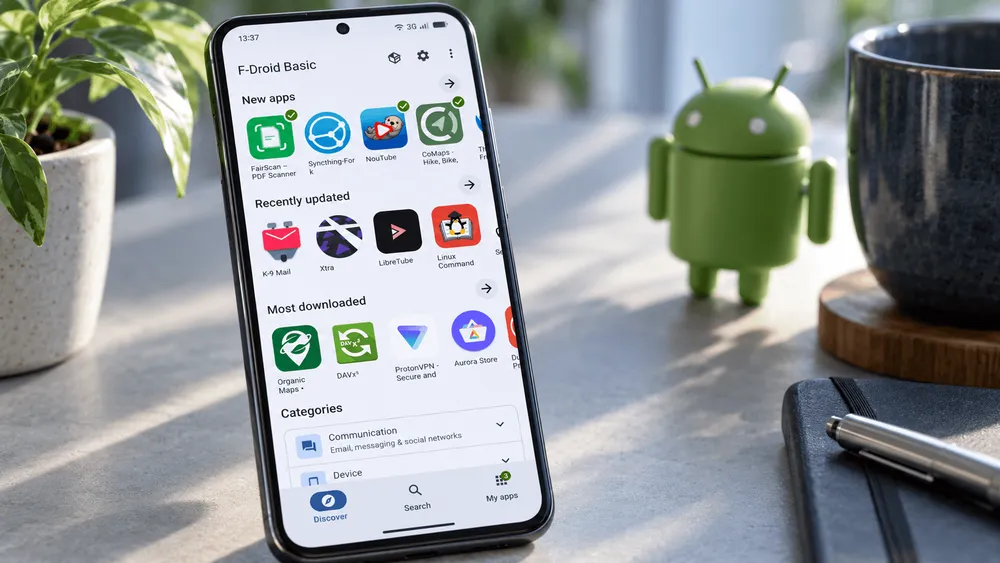
On September 24, 2026, F-Droid announced F-Droid 2.0, a new version of its official client for searching for and installing open-source Android apps.
The update was more than a year in the making and went through 14 test releases. It will roll out to users gradually over the coming weeks.
The development team calls it the biggest overhaul in the past 10 years. The changes range from improved search, including for Japanese, to installation confirmation and automatic updates.
However, some of the new ways of working depend on factors such as the Android version. In addition, the feature that removes apps in an emergency has not yet returned in 2.0.
Whether you should move to 2.0 right away depends on how you have been using F-Droid so far.
Finding apps by purpose, even if you don't know the name
In F-Droid 2.0, search covers not only app names but also descriptions and categories, and translated content is searchable as well.
The development team says it has greatly improved searching with Japanese, Chinese, Korean and other scripts.
This makes it easier to find candidates by what you want to do, even if you don't know the name of the app you need.
Search history is also saved, so you don't have to retype the same query repeatedly.
The screen layout for finding apps has changed significantly too.
The main screens are now organized into three: "Discover," "Search" and "My Apps." The former category screen has been merged into Discover.
Discover shows new apps and recently updated apps, as well as apps with many downloads.
Settings have moved to a menu at the top of the screen. "Nearby Swap," which lets devices share apps with one another, can also be opened from the same place on supported devices.
Categories have been broken down further.
VPNs, firewalls and similar apps are easier to find, and games, previously one large group, are now split into 17 genres.
At the same time, the finer categories are grouped under related parent categories, so the lists remain easy to navigate even as the number of classifications grows.
Search results can be narrowed by combining categories, device compatibility and items F-Droid flags as "anti-features."
The official announcement gives an example: show only action games that work on your device, then exclude apps that depend on external services that are not free and open source.
F-Droid says it made apps easier to discover without introducing any mechanism that tracks users.
The change should make it easier to find apps that are hard to judge by popularity ranking alone, according to your own criteria.
However, no quantitative comparison has been published showing how much Japanese search has improved over the previous version.
The fact that the search feature itself has been improved is separate from whether any given Japanese query will return the results you expect.
The OS that runs F-Droid 2.0 is not the same as the OS that supports the new install method
On supported devices, F-Droid 2.0 lets you approve an installation before the app download starts.
This streamlines the old procedure of choosing an app, waiting for the download to finish and then confirming the installation again.
Once you approve at the start, the download and installation can proceed in the background.
This is made possible by an Android installation API.
According to Google's Android 14 developer documentation, the user was previously asked for approval after the APK data had been written and the installation committed.
The pre-approval API added in Android 14 reverses that order, allowing the user's approval to be obtained first.
F-Droid 2.0 uses this mechanism in its new installer.
However, the Android versions that can install F-Droid 2.0 are not the same as the versions that can use pre-download approval.
Putting together the September 24, 2026 announcement, Google's API specification and the F-Droid 2.0.0 changelog gives the following picture.
| Item to check | Condition confirmed in official materials | What it means for users |
|---|---|---|
| OS support for F-Droid 2.0 | Support for Android 6 ends; Android 7 or later required | The minimum OS on which F-Droid 2.0 itself can be used |
| Pre-download approval | API introduced in Android 14 (API level 34) | A separate condition from F-Droid 2.0's minimum supported OS |
| When pre-approval is unavailable | If the API reports it is unavailable, the app falls back to the normal installation procedure | Even on Android 14 or later, the experience is not necessarily the same |
| When pre-approval fails on the F-Droid side | In 2.0.0, the request is canceled and the app switches to Android's standard confirmation screen | Normal installation still works even if the new method can't be used |
This table is not based on hands-on device testing. It organizes the app's supported OS and individual feature conditions based on F-Droid's announcement, the pre-approval API specification and the September 22 changelog for 2.0.0.
In practice, device support, permissions and whether the approval request succeeds also matter, so the Android version alone does not guarantee that you can use the new method.
More automated app updates
How app updates are handled is changing as well.
By default, F-Droid 2.0 automatically downloads and installs app updates.
Users upgrading from an older version will have their existing settings respected.
The changelog also describes a process that carries over the network and automatic-update settings from the previous version to 2.0.
As a result, not every existing user will be switched to the new defaults.
Settings for adjusting data usage and similar options remain available.
The action for manually checking for updates has moved to the three-dot menu in "My Apps."
The old gesture of swiping down on the screen to check for updates is gone, and swiping down is now used for ordinary scrolling.
The design now basically handles updates in the background.
Note that this automatic update feature is separate from the pre-download approval available from Android 14.
There is also a change for environments where F-Droid is built into the OS.
The privileged extension known as "F-Droid Privileged Extension" is currently not supported in 2.0 and will not be used even if it is installed on the device.
The development team says it prioritized support for Android's standard session installer.
It adds that recent versions of Android allow background updates without this privileged extension.
Features that haven't returned yet: check before updating
If you use F-Droid as part of an emergency security plan, you should be careful before updating to 2.0.
The feature that deletes or wipes specific apps on instructions from a trigger app such as Ripple has not yet returned in F-Droid 2.0.
The development team says restoring it requires specialized maintenance work, and it suggests that users who currently depend on the feature may want to postpone updating to 2.0.
No timeline for its return has been given.
This does not mean, however, that all of F-Droid's emergency "panic" features have been discontinued.
The official announcement says such safety features will remain a priority, and that the app-wiping function is the one that is unavailable for now.
Everyday convenience and keeping the protections you need in an emergency have to be checked separately.
The feature that disguises F-Droid as a calculator has also changed.
The old mechanism that actually behaved like a calculator has been dropped, and 2.0 only changes the app's icon and display name.
F-Droid itself still appears in Android's app settings, and a closer look at the device will reveal that it is installed.
In other words, it is not a feature that hides all traces of F-Droid being installed.
The development team says one reason for the change was to avoid leaving users with a misunderstanding about these limits.
Changes to Tor and Nearby
Tor-related settings have also been revised.
The automatic Tor detection feature, whose reliability had declined, has been removed.
The old "Use Tor" option has moved to more general proxy settings.
F-Droid recommends using Tor VPN for those who want to route traffic through Tor easily.
Proxy settings remain available for users who want to configure their own network route.
Support for Tor has therefore not been abandoned altogether.
For Nearby, it is worth distinguishing between the device-to-device sharing feature available now and the new implementation still under development.
On devices that support Nearby, the existing sharing feature can still be used from the menu at the top of the screen.
A new implementation that improves aspects such as how devices connect did not make it into the first F-Droid 2.0 release.
If you use device-to-device sharing regularly, you should not assume the new approach is already available in 2.0.
Devices running Android 6 or earlier are also excluded from the update to F-Droid 2.0.
F-Droid says older versions can continue to be used on old Android releases.
That does not guarantee, however, that those devices will keep receiving the same feature additions or security fixes.
When deciding whether to move to F-Droid 2.0, it helps to first check whether your Android version is supported, then whether automatic updates and the installation method work as you want, and finally whether you need emergency app wiping.
Not just a new look: the development foundation is rebuilt too
The way F-Droid 2.0 builds its screens has also changed substantially.
The new UI uses Jetpack Compose, Android's UI toolkit, and newly added code is written mainly in Kotlin, in line with the current Android development environment.
The aim of the development team is not simply to refresh the appearance.
It also wants to make it easier for developers familiar with current Android development practices to take part, and to make ongoing maintenance, testing and feature additions easier to sustain.
The new look based on Material Design is part of this complete rebuild.
Developers were not the only ones who supported the large-scale overhaul.
According to the official announcement, NLnet provided funding through Mobifree for Torsten Grote's development work.
The Open Technology Fund's UXD Lab worked with Ura Design to support user research and UI/UX design.
This update therefore revisited both usability for people using the app and the environment needed to keep developing and maintaining F-Droid.
On security, F-Droid says the Open Technology Fund's Security Lab and Convocation carried out independent reviews, and that it addressed the issues raised about the new app.
However, the full audit report had not yet been published at the time of the announcement.
Having undergone a third-party security review is not the same as a guarantee of safety on every device and in every way of using the app.
F-Droid 2.0 will be delivered to users in stages.
Several questions will be answered through real-world use. Is it actually easier to find the app you want in Japanese than before? Do automatic updates and installation run reliably across a wide range of Android devices? And will users who depend on emergency app wiping eventually be able to move to 2.0?
The key to judging this overhaul, described as the biggest in 10 years, is whether it can simplify everyday use while keeping the features that privacy- and security-conscious users have needed.