

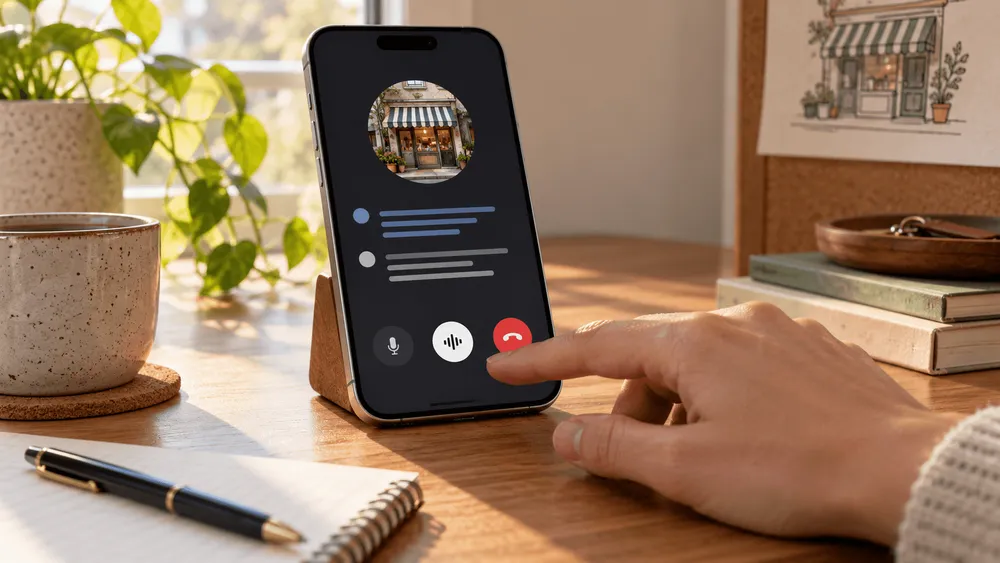
On September 24, Google announced "Call for Me," an experimental feature for the Pixel 11. Tell Gemini what you need, and it will phone a nearby business, navigate the automated voice menu, wait on hold, and even hold the conversation with a staff member. You can follow along in an on-screen transcript and take over the call partway through if you want to.
Google has previously offered a way to contact stores automatically through Search. What's different this time is that Gemini doesn't just gather information. It uses your own phone number and can go on to make or reschedule appointments.
Who can use it? Where are call records kept? Can a business refuse calls from an AI? The details of the experiment become clearer when you look at these conditions.
What Pixel 11 users can ask Gemini to do
Google's examples are everyday tasks: asking a store whether an item is in stock, booking a table at a restaurant, or changing the date of a salon appointment. Gemini's official help page also lists checking business hours and service prices, and confirming or managing reservations.
You tell Gemini what you need and confirm the number to be called. Gemini then handles the voice menu and the hold time and carries on the conversation. When the call ends, you're notified and shown a summary of the result.
For now, availability is limited. Under the conditions Google has set out, you must be 18 or older and a US resident, own a Pixel 11 with a US SIM, and subscribe to a paid Google AI plan. You also need the public beta of "Phone by Google" and the latest Gemini app, and your device language must be set to English. Calls can only be placed to US phone numbers.
That means that even if you own a Pixel 11 in Japan, you can't currently try the feature in Japanese or with Japanese phone numbers.
Google's announcement describes this as an early-stage experiment. It will roll out gradually to eligible users over roughly two weeks starting September 24, so even eligible users may not see it right away. Google hasn't said when other Pixel devices or Android phones in general will get it.
What has changed about AI that makes phone calls
This isn't Google's first feature that hands phone tasks to AI.
Pixels already have "Hold for Me," which waits on hold for you, and "Direct My Call," which shows voice menu options on screen. In November 2025, Google also announced "Let Google Call," offered to people searching for nearby products. It phones stores to check stock, prices and sales, combining Duplex technology with Gemini and sending the results to the user by email or SMS.
The 2025 Search version mainly delivered answers about stock and prices by email or SMS. The 2026 Pixel 11 version uses your own phone number to go as far as booking or changing appointments, and you can take over the conversation partway through if needed.
| Feature | How you start it and main uses | How you see the result |
|---|---|---|
| Search version (Nov. 2025) | Search for a nearby product and ask stores about stock, prices, sales and more | Results arrive by email or SMS |
| Pixel 11 version (Sept. 2026) | Call from the Gemini app using your own number to book or change appointments, check stock and more | View the transcript during the call and take over if needed; review a summary afterward |
This comparison is based on features explicitly described in Google's 2025 announcement, the current Pixel announcement and the help page on how to use it. It doesn't mean the Search version has no other uses or no way for users to step in.
In a May 2026 Search announcement, Google also said it would extend call-making to some categories, including home repair, beauty and pet care. So the name "Call for Me" alone shouldn't lead you to treat the Search-based service and this Pixel 11 experiment as the same thing.
The difference isn't only added convenience. It also changes who the call appears to come from.
The Pixel 11 version places calls over your own mobile line and number, and standard call charges apply. AI-assisted calling is now directly tied to your phone number and call history.
Confirmation before a call, and taking over during it
Gemini doesn't call a business the moment you give an instruction.
First you say what you want, along with your preferred dates, conditions and any alternatives. Gemini then shows the number it will call, plus details such as your name and contact information that it plans to give the other party. The call starts only after you review this and tap "Call for me."
Google's privacy explanation likewise spells out a step in which you consent in advance to the information that will be shared with the other party.
The person answering isn't kept in the dark either. According to Google, at the start of the call Gemini says it is Google's AI assistant calling on the user's behalf, tells the person the call will be recorded, and gives the user's name.
During the call, you can read the transcript or listen in through the Gemini app. Your microphone starts out muted, but tapping "Take over" lets you join the conversation. Gemini tells the other party about the handover and then steps out.
Being able to step back in has real practical value if the AI mishears an appointment time or a product name.
Still, being able to monitor and take over doesn't guarantee that a request will succeed. The conversation may move ahead while you aren't looking at the screen. Google also hasn't published call success rates or how often users needed to make corrections.
At this early stage, being able to make a call on your behalf and reliably completing your request need to be considered separately.
Where recordings and transcripts are kept
When a call ends, a summary of the result appears in the Gemini app. From the call history in Google's Phone app, you can view the full transcript and listen to the recording.
That makes it possible to check what was said later, but the records aren't stored in just one place.
According to Google's Gemini privacy hub, the transcript is sent to Google's servers and stored securely. A copy of the transcript and the recording also remain in the phone app on your device.
Google also says it doesn't store the audio recording of the call itself on its own servers. In other words, the recording being saved on the device is a separate matter from the content of the conversation not being sent to the cloud.
Google states explicitly that recordings and transcripts generated by these calls are not used to train AI models.
You can view and delete call history saved in your Gemini app activity, and you can also delete the call history, transcripts and recordings stored in the Phone app on your device.
The other party is told the call is being recorded, and you can review the content afterward. That also matters as a way to trace what happened if the AI misunderstands a request or the conversation goes differently than intended.
Businesses can opt out, and results are still unknown
Businesses can also choose not to receive automated calls from AI. Google's help documentation points to a dedicated page for declining automated calls from Gemini users.
In other words, even if you ask Gemini to make a call, the business may not go along with it.
Google itself says in its announcement that it needs to respect the time of local businesses and front-desk staff. It also cites the many circumstances and exceptions of real conversations as a reason for starting the experiment on a small scale.
There are limits on what you can ask for. Google caps the number of calls per day but doesn't state the specific number in its help materials. The feature can't be used for emergency calls, payments, reading out card numbers, calls involving sensitive information such as health data, or sales calls.
If a reservation requires a prepayment or sensitive personal information, Gemini alone may not be able to complete the process.
What Google has shown so far is a system in which AI places calls and carries on conversations, along with controls for both the user and the party receiving the call.
Judging how much effort the feature actually saves would require data such as how often requests were completed, how often users had to take over, and how many businesses accepted the calls. None of these figures has been published so far.
As Google expands beyond this limited Pixel 11 experiment, how much of this usage data it discloses is likely to be an important factor in assessing the feature's real-world usefulness.