

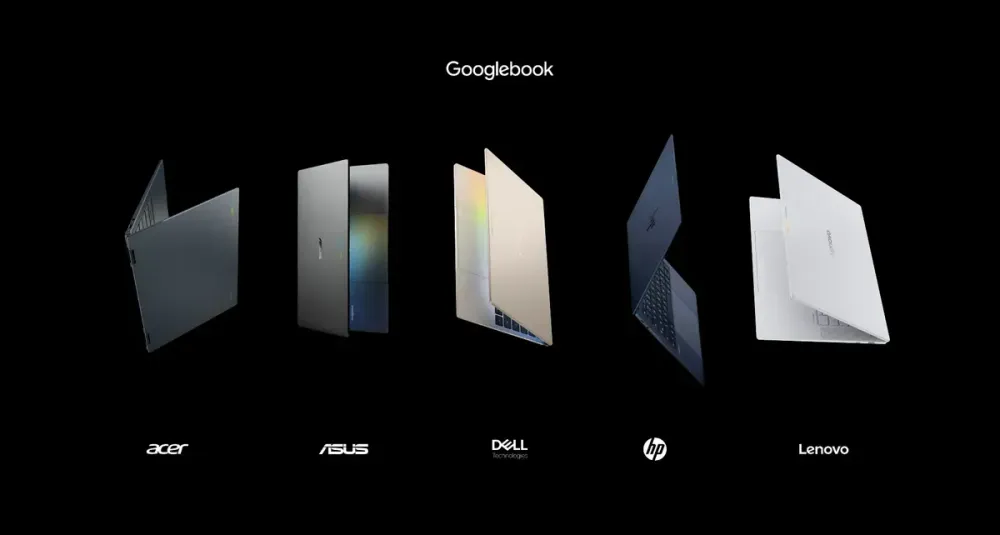
On September 21, 2026, Google opened preorders for five "Googlebook" models manufactured by Acer, ASUS, Dell, HP, and Lenovo. Prices start at $899. Retail sales begin on October 4 in the United States and October 5 in six other countries including Canada and the UK. Japan is not among the launch regions announced this time.
Googlebook, which first appeared in May, has now moved from concept to actual product. Google isn't simply aiming to replace budget Chromebooks. This is a long-term push to carry over the apps, files, and credentials people already use on Android smartphones into a laptop environment, positioning Googlebook to compete against Windows and Mac in the $899–$1,299 premium PC market.
The foundation for this is a design that separates the roles of the web, Android apps, and Linux rather than forcibly merging them into a single environment—while still combining them cohesively.
Making Android the shared foundation for PCs
Googlebook is built on Android's technology stack, layered with desktop features derived from ChromeOS. Whereas traditional Chromebooks have been centered on ChromeOS while incorporating Android apps, Googlebook positions Android itself as the common foundation shared between smartphones and PCs.
Google's own FAQ distinguishes Googlebook as a high-performance flagship laptop, while describing Chromebooks as ChromeOS devices focused on simplicity and efficiency.
The benefit of this shared foundation lies less in the sheer number of available apps than in how easily work can continue across devices.
During initial setup, users can transfer their Android smartphone's settings, saved passwords, Wi-Fi networks, and messages in an end-to-end encrypted state. While using the laptop, the Files app lets users open photos and files stored on their smartphone, and "Cast My Apps" allows phone apps to be displayed and operated within a window on the PC. "Continue On" is a feature that lets users resume work started on their smartphone directly from the PC's taskbar, for supported apps.
Gemini Intelligence is built in with this cross-device integration in mind.
"Magic Pointer" is a feature that lets users wave the cursor over on-screen text or images to send them to Gemini. "Rambler" organizes spoken content into headings, checklists, and similar formats. "Create My Widget" generates desktop widgets based on user instructions.
According to Google, Magic Pointer only activates when the user invokes it, and can be disabled entirely. Rather than an AI that proactively takes actions on its own, it's designed to shorten the steps needed to hand off information from the current screen to Gemini.
Sameer Samat, who leads Google's Android division, told Axios that the first-generation Googlebook is primarily aimed at the Android community and is not meant to replace all laptops. He noted that ChromeOS will continue to play a role in education and enterprise markets.
In other words, Googlebook isn't so much a direct successor that extends the Chromebook lineup as it is a new product line that starts from Android users and pushes into the premium PC market.
Dividing roles among the web, Android, and Linux
On Googlebook, three software environments each handle distinct roles.
Web apps and browser extensions run through the desktop version of Chrome. General-purpose local apps and games are installed from Google Play. And development tools or autonomous AI agents can run in a Linux environment equipped with a full-featured terminal.
To isolate the Linux environment from the core Android system, Google uses pKVM.
Google describes Googlebook's pKVM implementation as the first in a laptop to achieve what it calls "Level 5 security certification." However, the announcement materials don't specify the name of the certification scheme, the certifying body, or which version was evaluated. For now, this claim needs to be taken at face value as Google's own characterization.
The mechanics of pKVM itself, on the other hand, can be verified through Android's technical documentation.
pKVM separates the host environment that runs Android from protected virtual machines as mutually untrusted domains, tracking which environment owns each page of physical memory. This prevents another virtual machine or the host from reading or modifying memory without the owner's permission.
Android's documentation states that the EL2 code responsible for this protection totals roughly 10,000 lines, compared to roughly 20 million lines for the Linux kernel used as a point of comparison—reducing the attack surface of the protection mechanism by roughly three orders of magnitude.
However, what pKVM primarily guarantees is confidentiality and integrity. It does not guarantee availability—meaning services remain constantly accessible—since the host side can choose not to allocate CPU time or other resources to the guest. OEMs and SoC vendors also remain part of the trusted base; if an SoC fails to meet requirements such as DMA protection, the intended confidentiality guarantees don't hold either.
Therefore, the claim that "the Linux environment is isolated via pKVM" cannot be extended to mean the entire device is unconditionally secure.
Even so, this isolation approach has practical value. It allows Android apps to remain at the center of the PC experience while letting developers run shells, code repositories, and AI-agent-style tools in an environment separated from the core Android system.
Googlebook isn't simply a smartphone OS blown up to fit a larger screen. It's a PC that combines three environments serving different purposes—web, Android apps, and Linux—all built on an Android foundation.
Prices vary by model, despite the "starting at $899" framing
While the five initial models differ in chassis design and screen size, Google's U.S. comparison page shows all of them configured with 16GB of memory and 512GB of storage.
Processors split between three models using Intel Core Ultra 5 and two models using Snapdragon X Elite. NPU performance is listed at up to 45–49 TOPS.
| Model | Processor | NPU | Claimed Battery Life |
|---|---|---|---|
| Acer Googlebook 14 | Intel Core Ultra 5 | Up to 49 TOPS | Up to 16 hours |
| ASUS Googlebook 14 | Intel Core Ultra 5 | Up to 49 TOPS | Up to 16 hours |
| XPS Googlebook | Snapdragon X Elite | Up to 45 TOPS | Up to 18 hours |
| HP Googlebook 14 | Snapdragon X Elite | Up to 45 TOPS | Up to 19 hours |
| Lenovo model | Intel Core Ultra 5 | Up to 45–49 TOPS | Up to 13 hours |
Battery life figures are based on web-browsing tests conducted under controlled conditions and may be shorter in real-world use.
Additionally, Google's preorder announcement states "up to 14 hours" for the lineup as a whole, while the comparison page lists per-model figures ranging from 13 to 19 hours. Because the testing conditions and targets may differ, these numbers can't be directly compared as if they were equivalent. The actual difference between Intel-based and Qualcomm-based models will also need to be measured under identical conditions after launch.
Pricing shows an even clearer discrepancy.
As of Google's U.S. comparison page checked on September 22, 2026, the XPS Googlebook was listed starting at $999 and the Lenovo model starting at $1,099. Meanwhile, the Google Store's XPS spec page and Ars Technica list the XPS starting at $1,199. Ars Technica also reported the Lenovo model starting at $1,299—meaning the starting prices for each model don't match across sources.
Why the prices differ can't be determined from the currently published pages. There's no information confirming whether this stems from differing configurations or simply a lag in updating displays right after preorders opened.
What can be said with confidence at this point is that Acer occupies the lowest price tier at $899, and the initial lineup as a whole generally falls within a range up to roughly $1,299. When actually making a purchase, buyers will need to check the price shown at checkout for their chosen configuration, rather than relying solely on the comparison page's figures.
The real challenge isn't the number of apps, but usability
Google states that Googlebook supports millions of Android apps, many of which are optimized for large screens, keyboards, and mice. It also lists Adobe Photoshop, Lightroom, and CapCut as supported apps.
Being able to directly leverage the app assets accumulated on Google Play is a clear advantage compared to Chromebooks, which have historically centered on web apps.
But for a premium PC, what matters isn't simply whether an app "launches."
Can it take advantage of a large screen to display more information? Are keyboard shortcuts fully supported? Does it remain stable when multiple windows are open during long work sessions? These factors determine how usable the device actually is as a PC.
Google hasn't disclosed specific numbers for how many apps are optimized for large screens, or how much functionality major apps gain compared to their smartphone versions.
As for "Continue On," Ars Technica reports that it requires support from app developers, meaning not every app allows work started on a smartphone to be resumed seamlessly on the PC.
The same goes for gaming. While Android games can run directly on the device, larger PC titles are handled through GeForce NOW, which comes bundled with a one-year subscription.
Microsoft 365 is also listed as available in Google's FAQ, though some additional features require a separate subscription.
In other words, the "apps" available on Googlebook span multiple delivery methods—native Android apps, web apps, cloud streaming, and Linux tools. Buyers need to check ahead of time which environment will handle the specific tasks they need.
While brief hands-on articles covering all five models have been published ahead of launch, longer independent reviews that comprehensively test battery life, performance, app compatibility, the pKVM-based Linux environment, and Gemini features remain limited so far.
Whether spending $899 or more is worthwhile can't be judged by the total number of available apps alone. What matters is how much functionality and usability carries over when moving work from an Android smartphone to the PC.
A 10-year update promise matters less than October's hands-on results
Google is promising up to 10 years of feature updates and software support for Googlebook, along with 12 months of Google AI Pro and 5TB of cloud storage. It's also throwing in perks like 3 months of YouTube Premium, Adobe Photoshop, and a year of GeForce NOW.
However, the terms and regional availability of each perk need to be confirmed individually.
The long-term update commitment of up to 10 years does serve as evidence that this push to extend Android onto PCs isn't a short-lived experiment.
Still, there's no need to wait a decade to judge whether Googlebook succeeds.
What deserves attention first is the hands-on testing that will emerge after the October 4 launch. How much do battery life, heat, and app compatibility actually differ between the Intel-based and Snapdragon-based models? Can development tools and autonomous AI agents run stably for extended periods in the pKVM-isolated Linux environment? Will the number of large-screen-optimized apps on Google Play grow, and will more apps support "Continue On"?
It will also matter whether the current pricing discrepancies get resolved, and how Japanese pricing, keyboard input, warranty terms, and enterprise management features end up being offered.
There's no need to decide right now whether Googlebook will become a genuine alternative to Mac or Windows PCs.
If work begun on an Android smartphone can be carried over to a PC without losing functionality, speed, or usability—and if that experience can be delivered reliably across hardware from five different manufacturers—then Google will have succeeded in offering Android users a genuinely new premium PC option, distinct from both Windows and Mac.