


A new registry app with a modern design has appeared in a public Microsoft repository, prompting speculation that the built-in Registry Editor in Windows 11 may be getting an overhaul. On November 8, 2026, Windows Latest reported that it had built the app on Windows 11 and confirmed that it runs. However, this is not the announcement of a new standard tool. Windows Central reported the next day, November 9, that Microsoft executive Marcus Ash explained it is not a developer preview of a new regedit but strictly a sample app.
The Windows registry stores settings for the operating system and applications as a hierarchy of keys and values, and Registry Editor is the administrative tool used to view and edit that data. The newly published sample is more than a cosmetic redesign: it can access and modify the actual registry. A closer look at the public code, however, shows that many of the features expected of an administrative tool are still incomplete.
A WinUI Sample That Can Operate on the Real Registry
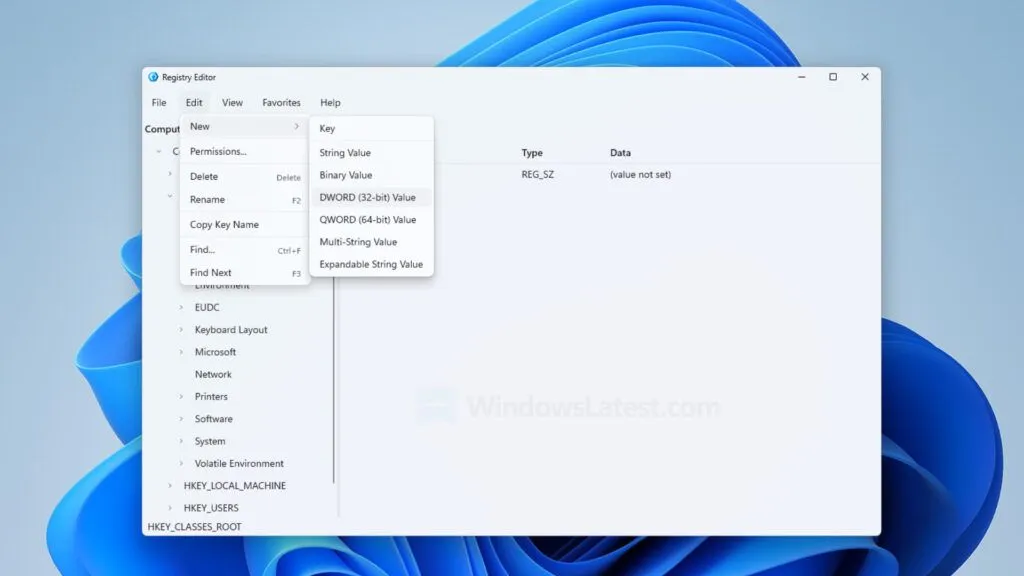
The app that drew attention is a sample included in Microsoft's "Reactor" repository, and it uses WinUI 3, the native UI framework for Windows. The public code also includes handling that specifies "Mica," the translucent background effect used in Windows 11. The Windows Latest author reported launching the sample on their own PC running Windows 11 Build 26340.9882 and confirming that registry keys were displayed. Note that this is the outlet's own hands-on testing; XenoSpectrum did not run the app on Windows.
The public code for registry operations uses .NET's Microsoft.Win32 to create and delete registry keys and set values. It can create six value types: regular strings, expandable strings, multi-line strings, DWORD, QWORD, and binary. In other words, the app is not a mockup that merely imitates the look of a registry editor; it has the ability to access the Windows registry directly. As an example of an application that works with real system data, the sample offers a certain level of functionality.
What Is Reactor, the Framework for Building WinUI Screens in C#?
Reactor, where the sample was published, is an experimental development foundation for describing WinUI screens declaratively in C#. Microsoft's official repository explains that Reactor is not a new UI platform but a new way of describing WinUI screens. The screens that actually appear use existing WinUI controls.
With Reactor, developers describe the screen layout according to the app's state, and when the state changes, the framework compares the before and after and updates only the parts that need it. For example, when the selected registry key or search criteria change, the screen updates to reflect that state. The sample likewise manages registry keys and values along with selection and search state, and reflects those changes in the UI.
Registry access and data reading and writing, meanwhile, are handled by a service separate from the UI. Reactor takes care of describing and updating the screen, while a service using Microsoft.Win32 handles the actual registry operations. Reactor is also designed to coexist with existing XAML and MVVM, and it is not meant to replace conventional WinUI app development wholesale. The sample demonstrates how to combine Reactor's state management and screen updates with data operations that use real Windows APIs.
A Fresh Look, but Administrative Features Remain Unimplemented
That said, the fact that the sample launches and displays the registry is a separate matter from whether it has all the features a standard administrative tool requires. On November 10, 2026, XenoSpectrum statically reviewed the UI-side public code, the registry operation code, and the official WinApp CLI guide, and found clear differences in how far each feature has been implemented. The table below summarizes the features and limitations that can be confirmed from the public code. Note that this assessment is based on the implementation status of the code and does not guarantee actual behavior or safety.
| Item checked | What the public code and official documents show | Caveats for evaluation |
|---|---|---|
| Key and value operations | Implements key creation and deletion and value setting. Can create six value types, including strings and DWORD | Functionality for operating on the real registry is implemented |
| Data import/export | Reads text equivalent to the .reg format from the clipboard and writes output to the clipboard | Differs from the usual import/export through a file selection dialog |
| "Export All" | Specifies HKEY_LOCAL_MACHINE as the export target | Does not output all registry roots |
| Administrative menus | Handling for permissions, loading and unloading hives, network, printing, and more is unimplemented | Menu items being displayed does not mean the corresponding features work |
| Official Reactor template | An experimental Reactor template is provided in WinApp CLI | Intended for developers to try Reactor; does not imply adoption in Windows |
| Adoption in the standard Windows regedit | No adoption plan can be confirmed from the publication of the sample or template | Any update to the standard Windows tool requires a separate official announcement from Microsoft |
Of particular note is the export feature labeled "Export All." The name generally suggests exporting the entire registry, but in the public code HKEY_LOCAL_MACHINE is explicitly specified as the output target. In other words, it does not process all root keys, and it would be a mistake to assume from the name alone that it can back up the whole registry.
The permissions handling also contains a comment indicating it is not supported in the initial implementation. For loading and unloading registry hives and similar functions, corresponding menus exist but the processing bodies are empty. These reflect the scope of the sample's implementation; the app is not a finished administrative tool. Because the code in the public repository may change in the future, this assessment is limited to the content retrieved on November 10, 2026.
An Official Template Does Not Mean a Standard Windows Feature
As for Reactor itself, Microsoft has provided ways for developers to use it. The official WinApp CLI guide lists a template for Reactor, and using it requires the .NET 10 SDK. However, the template references pre-release packages, so APIs may change or be removed in the future. The Reactor repository also states that the project is at an experimental stage.
Providing this development environment is meant to let developers try Reactor; it is not an announcement that the registry editor sample will ship as a standard part of Windows. What can be confirmed at this point is limited to the fact that a new screen composition combining Reactor and WinUI, along with code that operates on the real registry, has been published. Whether Microsoft plans to overhaul the standard regedit based on this sample has not been made clear.
To judge whether the standard Windows Registry Editor will be updated, Microsoft would need to present an official product plan. Key points would include which administrative features it would include, which Windows versions and users it would be offered to, and whether it would replace the existing regedit. The sample shows the possibility of building Windows administrative tools with new UI technology, but that does not mean it will be adopted in future versions of Windows as is. A technical experiment for developers and an update to a product delivered to general users should be treated separately.