


Apple officially introduced it in iOS 16, and the world's No.1 Google's web browser "Chrome" has also recently begun officially supporting it—this new authentication method that replaces passwords is called "passkey (Japanese)." This feature allows users to securely sign in to websites and services without using a password.
So what exactly is this passkey? How is it different from a password? And how does it work? In this article, we'll take a fresh look at "passkey," which is likely to become the standard authentication method for web services going forward.
Table of Contents
What is a Passkey?
A passkey is a new industry-standard authentication method designed to allow users to sign in to websites and apps without using a password, serving as a more convenient and secure replacement for passwords.
Unlike passwords, passkeys are designed to be resistant to phishing, robust, and to share no secrets.
Passkeys are stored on your computer or smartphone in the form of Fast IDentity Online (FIDO) credentials, and are used to unlock your online accounts. Passkeys are created using the security standard of the Web Authentication API (WebAuthn), which uses public key cryptography for access. Each key is unique and created with encrypted data, which enhances security. Proof that you own the credential is only displayed to your online account when you unlock your smartphone.
Because passkeys eliminate passwords—which can be leaked, exposed, or stolen—from the authentication flow, they can reduce the risk of account compromise. Furthermore, since passkeys, unlike passwords, are never reused across sites, the risk that stolen credentials will affect other accounts is also lower.
Passkey authentication requires either biometric authentication such as fingerprint or facial recognition, or a PIN or the swipe pattern used on Android.
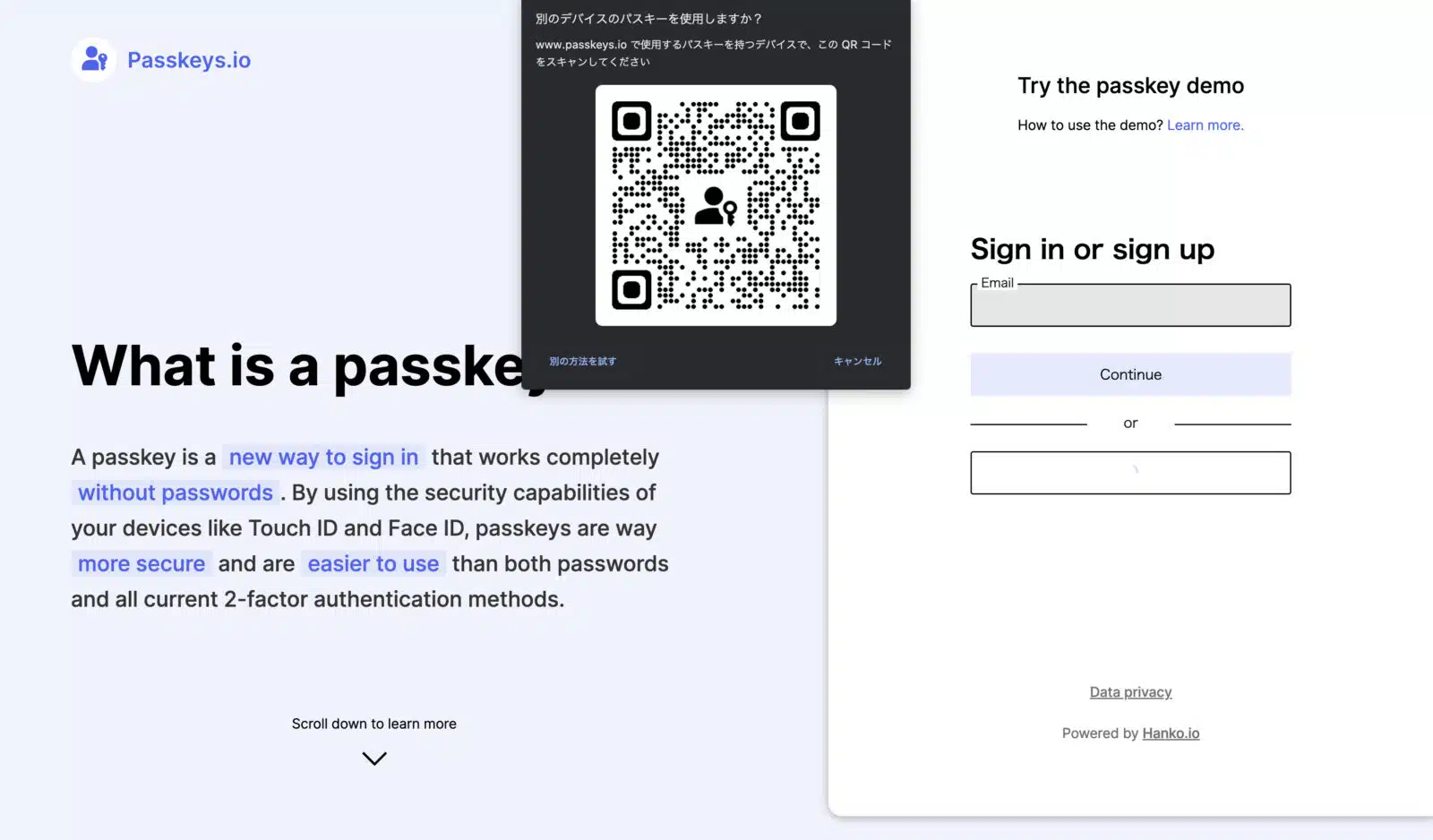
Since passkeys only work on the user's device, the passkey function cannot be used on a different device that lacks a QR code. Users can scan a QR code from their smartphone and use Face ID or Touch ID to sign in on another nearby device as well.
Revisiting: What is a Password?
A password uses a string of characters for identification when signing in. It typically functions in combination with a username. And a password must be unique—something known only to that user.
Password length requirements vary by service, and many allow special characters, letters, and numbers. To protect data, companies need to implement password policies that include strong password guidelines and regular update timeframes.
One of the biggest issues with passwords is the requirement to remember multiple passwords without reusing them. Password reuse can create security problems, because once a malicious actor obtains a password, they can use the same credentials to access various accounts. However, with the flood of web services available today, it's practically impossible to set a unique password for each one and expect users to remember all of them.
To help remember multiple passwords, users turn to password managers. A password manager uses a single master password or key to retrieve the correct password from a database in order to authenticate sign-ins to websites and applications. You may have used this in web browsers like Chrome or Safari, or in apps like 1Password. Once a user signs in to the password manager, it fills in the form and signs the user into each service, eliminating the need to remember multiple passwords. However, while using a password manager may help improve security by removing the need to memorize passwords and allowing different passwords for each service, the password manager's own password could still be stolen, so it's not completely secure.
How Do Passkeys Work?
Because passkeys are based on WebAuthn, users can verify login attempts using biometrics such as Face ID or Touch ID, or by using a PIN. At a higher level, instead of relying on a username and password combination, passkeys use the user's device to prove that the user is the legitimate owner of the account.
Google's Chrome passwords and Apple's iCloud Keychain synchronize passkeys across multiple devices through the cloud. When adding a new device, users need to sync the device in order to use passkeys.
At that point, passkeys use Bluetooth technology. Because Bluetooth has a limited range and requires devices to be physically close to each other, it helps with user verification.
If you visit a website that has already implemented passkeys, such as this demo site, on an iPhone you'll see a new sign-in option that lets you use your device or credentials stored in iCloud Keychain.
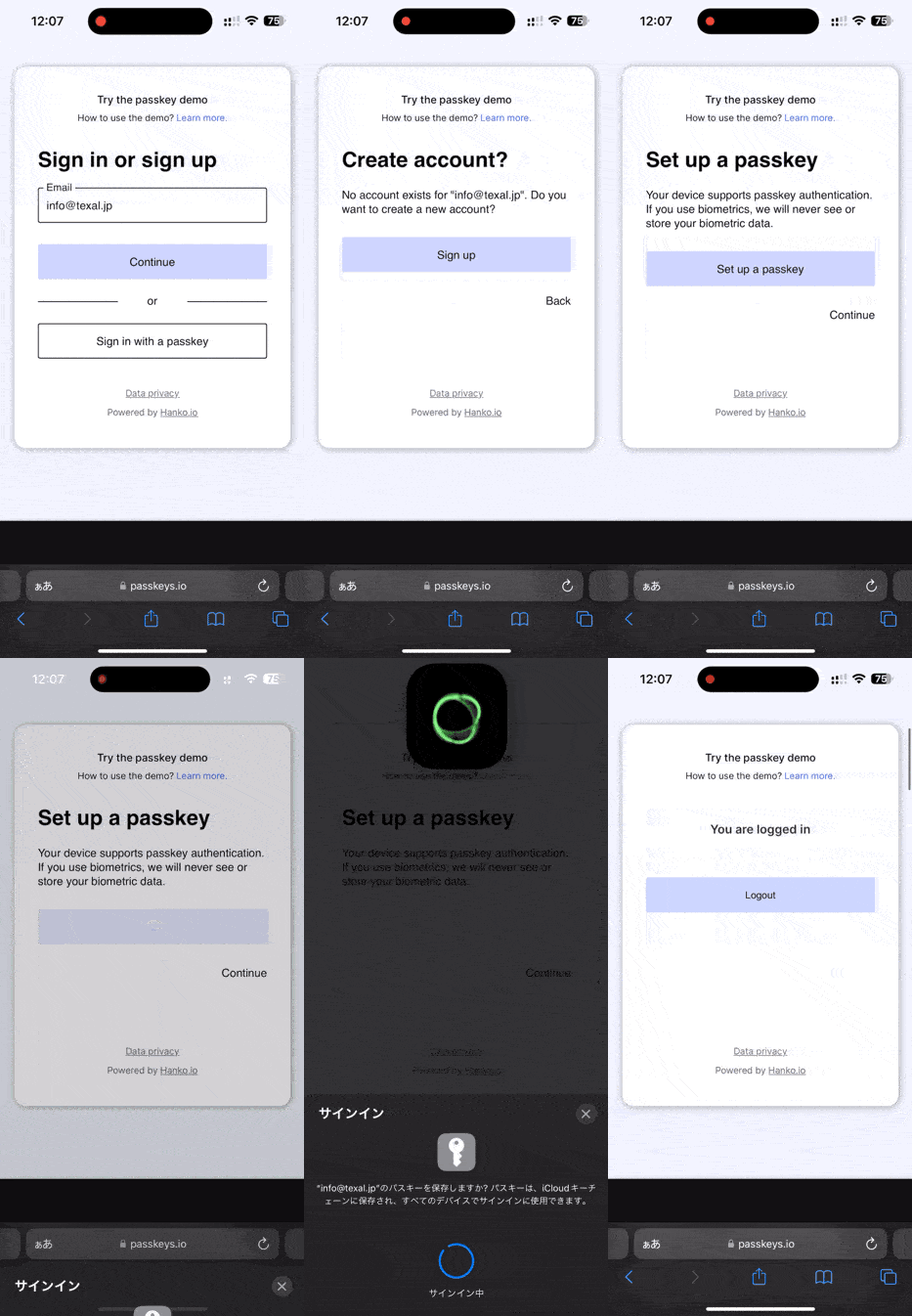
If you don't already have a registered account with the site, you'll be asked for some basic information, and you can save the passkey to iCloud Keychain without a password. Once you register an account, iCloud-based passkeys are shared across Apple devices using the same Apple ID.
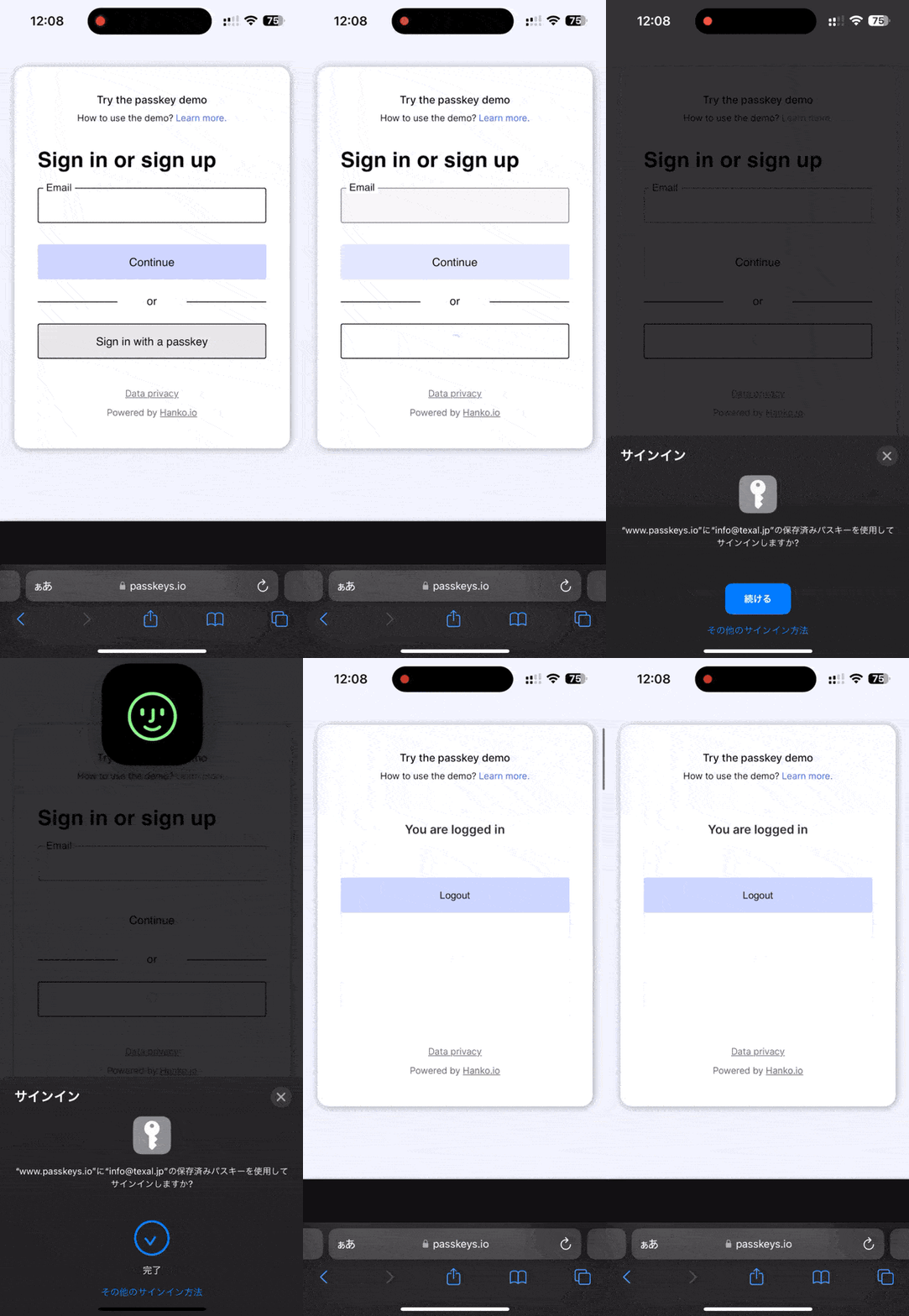
When signing in from a desktop, you can connect via Bluetooth to the smartphone where the passkey is stored, or use a QR code method.
All of this is based on the multi-device authentication proposed by FIDO, which allows authentication keys to be stored across devices so users can sign in without a password. In other words, it works across platforms. Google has implemented passkeys since Chrome M108, and has revealed plans to introduce passkeys to Android soon. Microsoft has not yet implemented this technology on its own platforms.
Passkeys work by generating a pair consisting of one public key and one private key, which are stored on the device. The public key is stored in the cloud and shared between devices that each hold their own private key. This ensures that even if a server is compromised, attackers won't have both keys needed to access the account, keeping the user safe.
Why Passkeys Are Better Than Passwords
Passwords remain the dominant authentication method today, but they're far from ideal. First, people have to remember their passwords. And realistically, changing passwords for every site or service you sign into and remembering all of them is impractical—hardly anyone actually does this.
Passwords are also inherently vulnerable to cyberattacks and data breaches. Malicious actors can use phishing scams to trick people into sharing their passwords on fraudulent websites. Once a password is leaked, it's easy for someone to sign in using it. Passkeys, however, aren't so easily stolen, because the data is stored on the device rather than on a server.
And passkeys are secure precisely because they're difficult to steal in the first place. A malicious actor trying to break into someone else's account would need to gain access to the device and obtain the fingerprint, facial recognition, or PIN needed to unlock it. Or, they would need to be physically near the person's device to use Bluetooth. Even if someone loses their device, a thief cannot access the information without the biometric data.
Additionally, each passkey is unique and created using strong encryption algorithms. Users no longer need to nervously rely on weak, guessable passwords just because they're easy to remember.
Generally, users tend to reuse the same password across multiple sites and services, so if a malicious person learns that password, they could gain access to multiple accounts. Weak passwords create vulnerabilities for both users and companies alike. With passkeys, there's no need to remember a password in the first place.
According to the FIDO Alliance, password-only authentication is a major security problem and is also inconvenient for consumers. When consumers reuse passwords, the risk of data breaches and identity theft increases significantly. Even with password managers and two-factor authentication, passwords are still stored online and can be stolen. The efforts of the FIDO Alliance and W3C represent an industry-wide collaboration to make sign-in technology both easier to use and more secure.
While users won't be forced to use passkey technology, as iOS and Android begin adopting it, more and more websites and apps will likely start offering passkeys as an option going forward.
Sources