

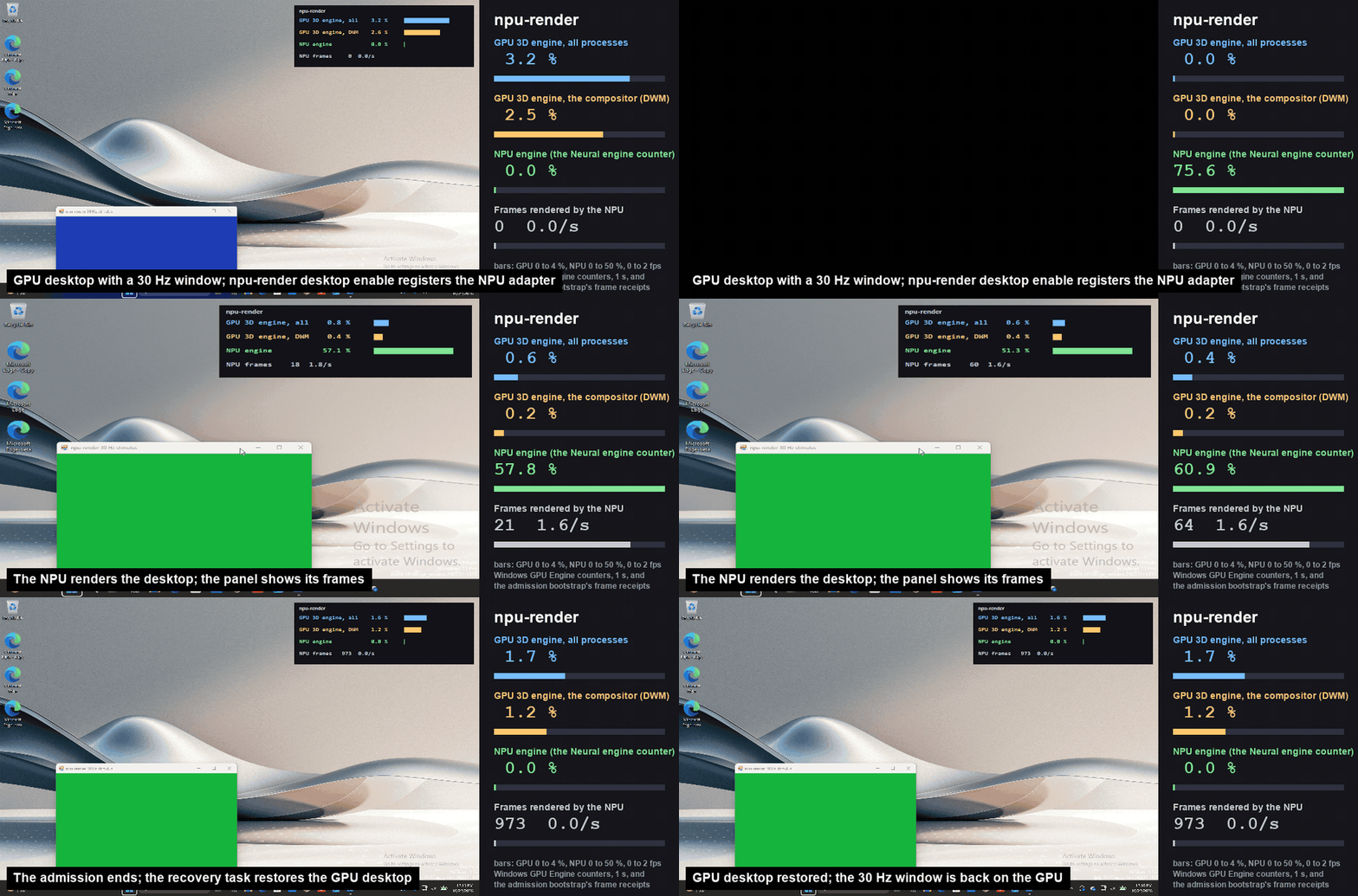
A research driver called npu-render has been released that composites the Windows 11 desktop on Intel's NPU (Neural Processing Unit) instead of the GPU. npu-render, published on GitHub by labscommunity, moves the work of combining each window's image into a single desktop picture onto the NPU, and builds a path to show the result on a physical display. It is an interesting attempt to use an NPU for something other than AI, but being able to show a picture is not the same as being able to use it comfortably. The test results published by the developer show both a technical achievement and the obstacles that remain before practical use.
How the driver moves Windows desktop compositing to the NPU
In Windows, the Desktop Window Manager (DWM) manages the image of each application window and combines them to produce the final desktop picture. According to Microsoft's official documentation, the process in which each application draws the contents of its own window is separate from the process of compositing multiple windows into one screen. Normally, the GPU handles the latter compositing step.
What npu-render moves to the NPU is this desktop compositing step. A dedicated user-mode driver gathers the Direct3D 10 drawing commands sent from DWM in frame-sized batches, and a separate worker process executes them on the NPU. The resulting image goes through an indirect display driver and is shown on the physical display. However, applications and DWM continue to use Direct3D as usual, so this does not move the PC's entire graphics workload to the NPU. Some GPU processing also remains in the path to the actual display.
What stands out is the method of running ordinary graphics processing on an NPU designed for AI. Intel's NPU plugin for OpenVINO generally compiles an AI model into an NPU-ready format and executes it through the Level Zero API. In npu-render, a small "ScatterElementsUpdate" model is compiled first, and part of its executable code is then replaced with a custom rendering program. This lets the programmable compute cores in the Intel NPU, known as "SHAVE," run processing unrelated to AI inference.
The custom rendering program includes a rasterizer that converts shapes into pixels, as well as vertex processing, texture lookups and image compositing. The developer expanded the code region from 24KB to 48KB and converted 38 sets of shaders used by DWM and WinUI into C code in advance. The system also splits the image into small regions and passes the NPU only the texture data each region needs. The output of each step is checked against reference results, and the design switches to a different processing path if a mismatch occurs. It is not an implementation of all Direct3D features on the NPU, however; it covers only the processing used in real desktop compositing.
The screen displays, but updates arrive only 2.5 times per second
The developer verified rendering accuracy separately from the performance needed for actual use. First, 234 verification items included in bundle v23 were processed on a real NPU and compared pixel by pixel with reference results. In "trial12," which tested sustained operation, 744 command batches totaling 9,363 commands were processed over 2,160 seconds, and the self-test found no mismatches. During that time, 342 frames were submitted for display on the physical monitor.
It is important to note that 744 is not the number of frames actually displayed. It is the number of command batches processed, which must be distinguished from the frames used for the physical screen. The tests confirm, at separate stages, that the rendering output matches the reference images, that the processing runs on the NPU, and that images reach the actual screen.
In a responsiveness test, 300 updates were requested at 30Hz on a 1024×768 pixel screen. However, the verified screen update rate was only 2.5 per second, far short of the 30Hz target. Latency from mouse input to on-screen display had a median of 94 milliseconds, but the 95th percentile reached 1.5 seconds. Compositing that includes blur can take seconds, so the current system does not deliver the smooth operation expected of an ordinary Windows desktop.
These results were measured by the developer on a laptop with an Intel Panther Lake processor. The test environment was Windows 11, Intel NPU driver 5540 and OpenVINO 2026.4.1, and there has been no independent third-party replication or verification in a peer-reviewed paper. The performance should therefore not be taken as representative of Intel NPUs in general.
GPU usage fell, but performance and power-saving benefits are unproven
One goal of npu-render is to reduce GPU load by moving desktop compositing to the NPU. In the developer's tests, GPU usage did fall in some cases. Whether that speeds up other GPU work or lowers the whole PC's power consumption, however, remains unclear.
Based on the test log published by the developer and the README, the main measurements and their limits are summarized below.
| Test / condition | Main measurement | What it shows and its limits |
|---|---|---|
| Recording test v126: redrawing a 560×360 pixel window at 30Hz | GPU 3D usage fell from 3.4% to 0.6%. Median NPU usage was about 58%, and about 1.6 frames per second reached the real screen | GPU load fell, but the actual display rate did not reach 30Hz. GPU-based mirror compositing for the screen also remains |
| GPU control test: 30Hz color change in a GDI window, 270 samples | 99th-percentile GPU 3D usage was 0.37% | A separate test using a different stimulus from NPU trial12 |
| NPU trial12: 30Hz stimulus using the presenter relay | 99th-percentile GPU 3D usage was 0.37% | Same figure as the control test, but not a direct comparison with matched display performance or stimulus conditions |
| After recovery to GPU display in recording test v126 | GPU 3D usage was 1.85% after recovery, versus 3.37% before the start | Window layout was not restored, so this is not a same-condition comparison |
In recording test v126, GPU 3D usage fell from about 3.4% to 0.6%, with median NPU usage of about 58%. However, this shows that part of the workload moved from the GPU to the NPU; it is not evidence that other GPU tasks became faster. In this test, the 1024×768 pixel screen generated by the NPU was enlarged to fit the physical display, and that step still used the GPU. The 30Hz figure is also the frequency at which window redraws were requested, not the actual display rate. A total of 969 frames composited by the NPU reached the screen, averaging about 1.6 frames per second.
GPU usage and NPU usage are not metrics of the same amount of work in the first place. Subtracting one from the other does not give processing efficiency or power savings, and the tests do not present power-consumption comparisons while maintaining equivalent image quality and frame rate. The developer himself assesses that it has not been demonstrated whether computing resources that could be devoted to other GPU work actually increased.
Measurement conditions also need attention. In the recording test, there was a stretch in which the physical screen returned to GPU display about 90 seconds before NPU processing ended. The lower GPU usage after recovery than before the start is explained by the inability to restore the redrawing window to its original position. Given these results, all that can currently be confirmed is that part of the GPU's processing load moved; whether practical performance gains or power savings can be achieved must await further verification. The table figures are a summary of the developer's published materials, not the result of independently verifying all raw logs.
Display speed is not the only obstacle to practical use
For practical use, recovery after failures is a major challenge alongside screen responsiveness. npu-render includes a mechanism to return to normal GPU display triggered by user action or a failure, and stable operation for up to 40 minutes has been recorded. However, in a recovery test conducted with applications open, only 7 of 14 window placements were restored, and the foreground window that was being operated was not restored either. Even if the screen can be displayed again, the work environment is not fully restored.
Resuming from sleep also remains an unresolved problem. Ordinary PCs sleep and resume frequently, so everyday use would be difficult if switching the display path caused window layout or working state to be lost. The developer has built a mechanism to recover to GPU display, but returning the display to a normal state and letting users resume work exactly where they left off need to be evaluated separately.
The barriers to adoption are also high. The source code of npu-render is published under the Apache License 2.0, but use requires Windows 11 with a supported Intel NPU, plus test-signing mode and administrator privileges. It also requires a specified version of the OpenVINO SDK, the Windows Driver Kit (WDK) and a SHAVE toolchain that is not redistributed in the repository. If problems occur, the desktop may become unusable for several minutes, so it is not at a stage intended for general users. Although OpenVINO's NPU plugin itself supports multiple generations of Intel NPUs, npu-render has not been verified to work on all of them.
As the developer positions npu-render as "a research prototype, not a product," the achievement here is demonstrating a technical path that runs Windows desktop compositing on an NPU and carries it through to an actual display. Update speed, however, has not reached a practical level, and performance and power benefits from reduced GPU load have not been confirmed. Going forward, important indicators of practicality will be comparisons of performance and power consumption under conditions that match the GPU's image quality and responsiveness, and whether working state can be preserved correctly when recovering from failures or sleep.