

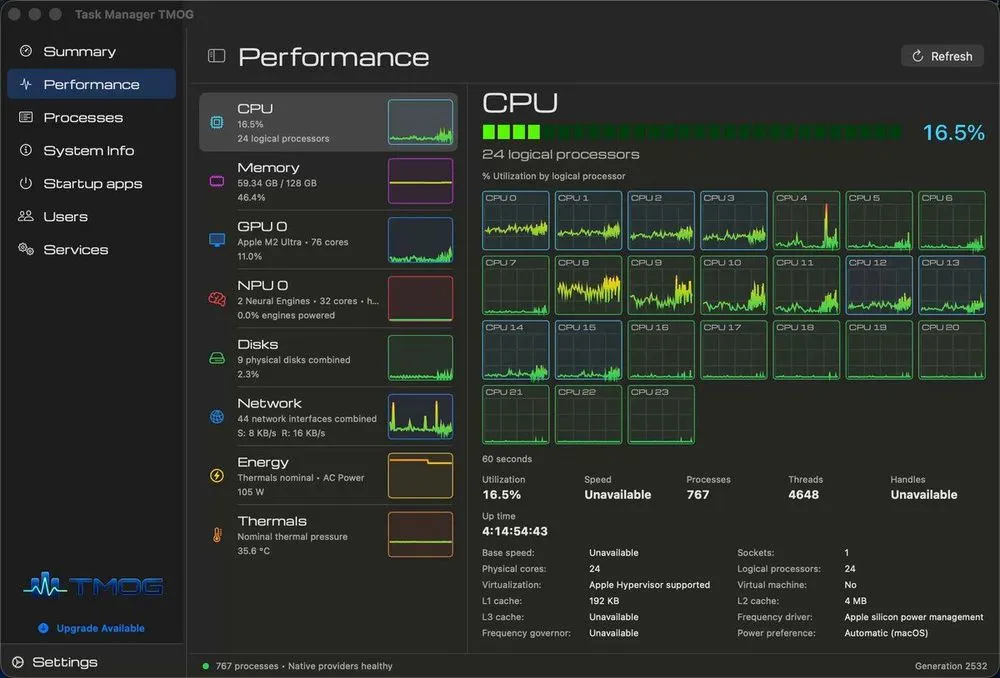
Dave Plummer, known as the original developer of the Windows Task Manager, has released a beta version of a new system monitoring application for macOS called "TMOG" (Task Manager OG). It is currently available for direct download from his website.
TMOG is a utility that integrates process management with system resource monitoring. From a single screen, users can check CPU and GPU usage, memory load, network bandwidth, and temperature sensor readings in real time. For the CPU in particular, it visualizes the behavior of each logical core, clearly distinguishing between performance cores and efficiency cores.
In addition, disk activity monitoring is rendered at 60 frames per second (60fps), allowing users to catch sudden load spikes without missing a beat. Beyond monitoring, the app also includes system management features such as startup app management and system service control.
Dissatisfaction with Activity Monitor as the Driving Force
Plummer's reason for developing TMOG is extremely simple: he was dissatisfied with the functionality of "Activity Monitor," the tool built into macOS by default. On social media, he described the standard tool as "blows." He revealed that while Activity Monitor may be sufficient for general users, he felt it fell short as a tool for developers and power users who want a deep understanding of what's actually happening in their system—so he decided to build the ideal tool himself.
::tweet[https://x.com/davepl1968/status/2083231935632204086]
Plummer worked at Microsoft in the 1990s, and a program he wrote as a hobby project caught the eye of the person in charge of Windows NT at the time, leading to it becoming the standard built-in Task Manager. He is a legendary engineer who was also involved in native ZIP file support and the porting of Space Cadet Pinball to Windows NT.
In developing TMOG this time, Microsoft reportedly granted Plummer permission to reference the source code of the Windows XP-era Task Manager. However, TMOG's interface was written from scratch using Swift, and none of the old code was used. By committing to a native implementation, the app efficiently extracts silicon-level information from deep within the OS.
Why a New Monitoring Tool Is Needed Now
The background behind Plummer's decision to introduce this advanced monitoring tool for Mac at this particular moment lies in the increasing hardware complexity brought about by the rise of Apple Silicon (the M-series chips).
Today's Macs adopt a heterogeneous configuration in which performance cores (P-cores) and efficiency cores (E-cores) coexist within a single chip. Furthermore, elements such as the GPU responsible for image processing, the Neural Engine specialized for machine learning tasks, and the unified memory shared at high speed by all of these components work closely together. However, it's difficult to intuitively grasp how this complex architecture cooperates using the standard Activity Monitor.
TMOG was designed precisely to bridge this gap. It tracks in detail the behavior of each logical core and how processes branch out while requesting resources. For developers, being able to check in real time whether their own application is being properly assigned to P-cores or E-cores is extremely important for performance tuning.
A Different Approach from Existing Tools (iStat Menus, etc.)
Of course, excellent system monitoring tools already exist for macOS. Representative examples include "iStat Menus" and "Stats," which reside in the menu bar and provide a wealth of information, as well as "TG Pro," which specializes in precise fan control. Many Mac power users have long relied on these tools.
While these existing tools primarily emphasize "continuous monitoring" and "natural integration into the menu bar," TMOG takes a different approach. Fittingly for a tool descended from the Windows Task Manager lineage, TMOG aims to serve as a powerful dashboard that you "launch when a problem occurs to get an overview of the entire system." Rather than merely listing information, its UI is designed to enable seamless transitions to control functions such as force-quitting processes and managing services.
Coexistence with existing tools is possible, but for troubleshooting during system issues, TMOG's style of "viewing everything from a single window" could become a new option. Refined from a developer's perspective, this tool has the potential to become indispensable for those who want to squeeze every last bit of performance out of their Mac.
Bypassing App Store Restrictions for Direct Distribution
Initially, Plummer planned to distribute TMOG through the Mac App Store. However, Apple's strict sandboxing requirements stood in the way.
Under App Store rules, applications cannot retrieve a system-wide process list or force-quit other applications. These are essential functions for a task manager, and it turned out that these requirements could not be met within a sandboxed environment.
For this reason, TMOG is being offered as a direct download that bypasses the App Store. Although the distribution format has changed, the application has been signed and notarized by Apple, ensuring compatibility and security on macOS 13 and later.
TMOG is currently offered for free. Plummer has hinted at the possibility of eventually offering a paid Pro version with additional features, but he plans to continue providing the basic functionality for free. He has also mentioned wanting to eventually release a version of TMOG for Windows as well, in order to offer a unified monitoring experience across both operating systems.