

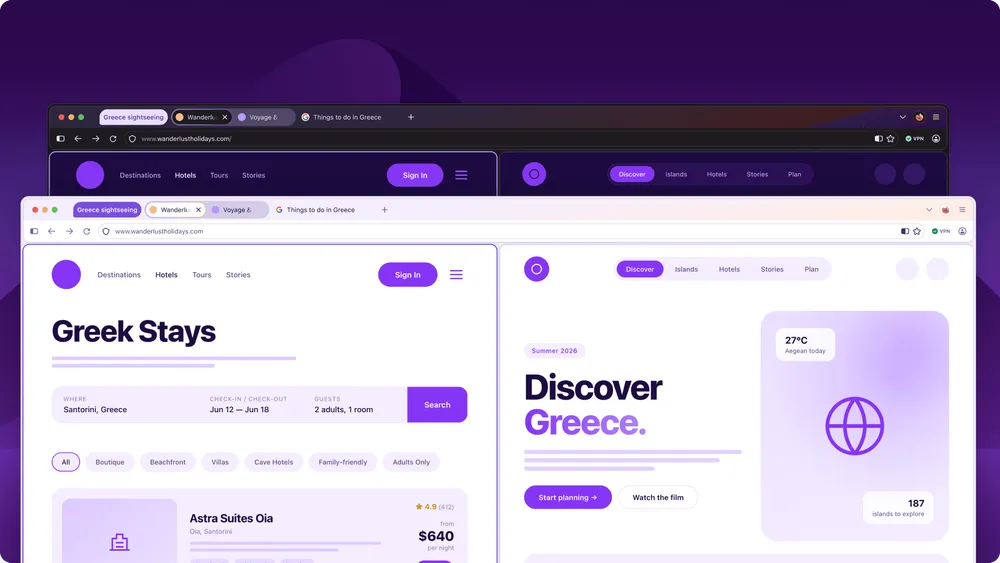
Files for Firefox 157.0 for Windows, macOS, and Linux have appeared in Mozilla's official distribution archive. The changelog for the 157 Beta, published by Mozilla on September 14, lists the new "Nova" design, the revival of compact mode, and hardware decoding of AV1 video during WebRTC calls on supported devices as the main changes.
However, as of the check in the early morning hours of September 29 (Japan time), the official changelog for the stable 157.0 release had not yet been published. The fact that distribution files have been placed on the server needs to be considered separately from whether general users have actually started receiving the update through automatic updates.
So how does this version change the screen design and video calling, and in what environments will nothing change?
Starting with Firefox 155, Mozilla moved to a new release cycle in which major versions ship every two weeks. Version 157 is a release under this new cycle, and the Beta announced a major overhaul of the screen design.
However, the fact that the release interval shortened from the previous four weeks to two weeks doesn't mean that twice as many new features ship each time, or that development itself has doubled in speed. Mozilla explains that the change is meant to increase the opportunities to deliver completed fixes and features to users and to make release timing more predictable.
Nova changes not just the look, but how you use the screen
The design overhaul that Mozilla's UX team has been calling "Project Nova" is not simply a matter of rounding the corners of tabs.
Tabs, panels, menus, and other elements are being unified under a common design system, with icons, color schemes, and spacing all reconsidered. The active tab uses a subtle gradient, among other touches, giving the browser as a whole a sense of consistency while making it easier to see where you are currently working.
This approach didn't appear out of nowhere. Mozilla published the direction of Project Nova in May, and on September 14 announced the actual screen redesign in the 157 Beta changelog. Nova was not listed in the changelog for the immediately preceding 156 stable release.
The 157 Beta presents Nova as a major change, showing that after months of design and testing, it has moved closer to rollout for a wider audience.
That said, the Beta changelog explicitly states that "features listed here may not make it into the final release." Since the official changelog for the stable 157.0 has not yet been published, it cannot be said with certainty that everything listed in the Beta has made it, as-is, into the official release for every environment.
For those who want to use as much of the screen as possible, the revived compact mode may be the change that's easiest to notice.
According to Mozilla, compact mode reduces the margins around the toolbar and tabs, expanding the display area for web pages by that much. On laptops with small screens, or when working with multiple windows side by side, this practical difference can matter more than the roundness or color of tabs.
The new built-in theme comes in both light and dark versions, so the appearance can also be chosen.
On the other hand, not every fine-grained UI adjustment that Mozilla has presented as the future direction of Project Nova is being introduced in 157. The overall Nova concept and the features explicitly stated to ship in the 157 Beta need to be considered separately.
What actually changes with hardware decoding for AV1 calls
The 157 Beta changelog explains that for video calls using WebRTC, AV1 video decoding can now be handled by hardware on supported devices.
Decoding refers to the process of converting compressed video data sent by the other party back into video that can be displayed on screen.
Previously, whenever Firefox's WebRTC received AV1, this process was always handled in software. The change announced in the 157 Beta makes it possible to offload this process to supported hardware.
So this is not a case of Firefox supporting AV1 video playback for the first time. Nor is it a change that allows AV1 video you send yourself to be hardware-encoded. What's affected here is the decoding process for AV1 video received during WebRTC calls.
Tracing Mozilla's development records shows that hardware decoding for AV1 calls was disabled in 156, and the necessary fixes came together in 157.
| Mozilla's records | What happened with hardware decoding for AV1 calls |
|---|---|
| Bug 2062642 | A mechanism for detecting AV1 hardware support was added, but was disabled in 156 due to a separate bug. The fix status lists 157 as "fixed." |
| Bug 2069901 | Fixed an issue where, even when hardware support could be detected, Firefox could fail to create an AV1 platform decoder for WebRTC. Recorded as fixed in 157. |
| 157 Beta changelog | States that on supported devices, hardware decoding of AV1 can be used during WebRTC calls. |
With only the first fix in place, there were cases where a website could determine that "power-efficient hardware decoding is supported," yet Firefox was actually unable to create an AV1 hardware decoder.
The second fix is meant to resolve this discrepancy.
In other words, for users to actually benefit, several conditions must align: the calling service must use AV1, the device and OS must support AV1 hardware decoding, and Firefox must be able to make use of that decoder.
Mozilla developers state that hardware decoding is expected to reduce heat generation and power consumption. However, no specific measurements are given for 157, such as how many watts of power consumption are reduced or how many extra minutes of battery life can be expected.
Comparisons with the previous version also require distinguishing between different targets.
The hardware decoding listed in the official 156 changelog covered WebRTC H.264 on Windows ARM64 devices. This is a different codec, with different usage conditions, from the AV1 support announced in the 157 Beta.
If you want to check differences in video quality, CPU load, heat generation, and so on during video calls, you need to check not just the Firefox version, but also which codec the service you're using actually selects.
Changes to video, search, and web standards
The 157 Beta changelog also lists a fix for an issue on Windows where some 8-bit HDR video formats displayed darker and grayer than they should.
An issue causing audio and video to fall out of sync when repeatedly switching video playback speed has also been improved.
However, these fixes don't mean that the quality of every HDR video, or audio sync across every video service, will improve. The benefit applies when the video format or operation you're using matches the conditions targeted by the fix.
There are also changes to search functionality.
Amazon is scheduled to be removed from the list of built-in search engines, but Mozilla explains that it can still be added as a custom search engine from search settings. This does not mean that Amazon product search itself becomes unavailable from Firefox.
Also, when pressing the Tab key in the address bar or search bar, focus will move directly to the text input field instead of stopping once at the search engine button. The search engine button can still be reached with Shift+Tab.
This is a change that will be more noticeable to those who primarily operate the browser via keyboard.
There are also changes for web developers.
According to MDN's documentation for 157, it will become possible to use at-rule() within CSS's @supports to determine whether the browser supports a specific CSS rule.
In WebGPU, TRANSIENT_ATTACHMENT is being added for temporary textures used only during a single rendering pass. Under the right conditions, this is a mechanism that can reduce unnecessary data transfers and memory allocation with GPU memory.
However, MDN's page for 157 currently covers the Beta version, and it is explicitly noted that the documentation itself is still being edited.
Changes are also planned for enterprise management features.
The administrator documentation lists a policy for allowing or blocking on-device speech recognition, as well as a change that displays which item caused the problem when some policies fail to apply.
These, too, are treated as features planned for future delivery with respect to 157.
Because the features available and the timing of their application can differ between the general release of Firefox and the long-term support ESR version, organizations deploying it internally need to check not just the regular changelog, but also the change information intended for administrators.
Check the official changelog and your device conditions before deciding to update
It can be confirmed that distribution files for Firefox 157.0 have been placed on Mozilla's servers.
However, whether the official changelog for the stable release has been published, and how far distribution to general users via automatic update has progressed, needs to be checked separately.
The visual changes from Nova and the compact mode are relatively easy to confirm just by looking at the screen after updating.
AV1 hardware decoding, on the other hand, cannot be evaluated simply by installing Firefox 157. Its effect can only be assessed on a supported device, in a scenario where an actual video call is using AV1.
Firefox moved to a two-week release cycle starting with version 155. Within that new cycle, Nova stands out as one of the notable changes in the 157 Beta.
After checking which features ultimately made it into the official changelog, those wanting to make better use of screen space should look at compact mode, while for video calls, the codec actually in use and the state of hardware support should be checked.
Only once these conditions are all confirmed can the changes to screen usability and the efficiency of AV1 call processing brought by Firefox 157 be properly evaluated in your own environment.