


On November 11, 2026, Google announced the Gemini Decisions API, a new API that can evaluate up to 1,000 questions at once about materials such as images and PDFs. It uses a dedicated AI model, "Gemini Decision 1," which calculates a probability for each option or evaluation criterion that a developer defines. Rather than generating answer text like conventional generative AI, it specializes in making judgments from a predefined set of choices. The API is offered as v1beta in the Gemini Developer API, and prototypes can be built in Google AI Studio using the free tier. Google plans to make it available in Gemini on Google Cloud as well.
For example, from the photos and description attached to a repair inquiry, the API can determine in one pass whether the request is eligible, which desk should handle it, and how urgent it is. Because each answer comes with a probability, you can build a system that automatically routes clear-cut cases to the right desk and sends only the difficult ones to a human. You no longer need to resend the same materials with every question, which also keeps API costs down. However, the questions bundled into a single request must be ones that can each be answered independently.
Up to 1,000 questions on the same material, with answers returned as probabilities
The Gemini Decisions API supports multimodal input combining text, images, audio, video, and PDFs. According to the official developer guide, a single request can specify up to 1,000 questions, and the context length for the shared input and all questions combined is 262,144 tokens. Materials such as images and PDFs are passed as shared input, while each question specifies its judgment criteria and evaluation standards in text. The larger the materials, the fewer tokens remain for questions and criteria.
With the existing Gemini Interactions API, you can extract data in a specified JSON format or generate the arguments needed to run a tool. Gemini Decision 1, by contrast, skips token-by-token answer generation and evaluates candidates in a single forward pass (inference step). What it returns is a yes/no probability, a probability distribution across choices, or a graded rating. For example, you could first determine whether a customer inquiry qualifies for a return, and only if it does, hand off drafting the reply or calling tools to a separate generative AI.
Importantly, each question is evaluated independently of the others. According to Google, adding or removing a question does not change the answers to the other questions. For example, you can ask "Is the product damaged?" and "Which repair category applies?" at the same time, and use the repair-category answer only if damage is confirmed. If, however, you want the damage result to change the candidate repair categories themselves, the application must receive the first result and build the next request.
Three judgment types, and how to use confidence
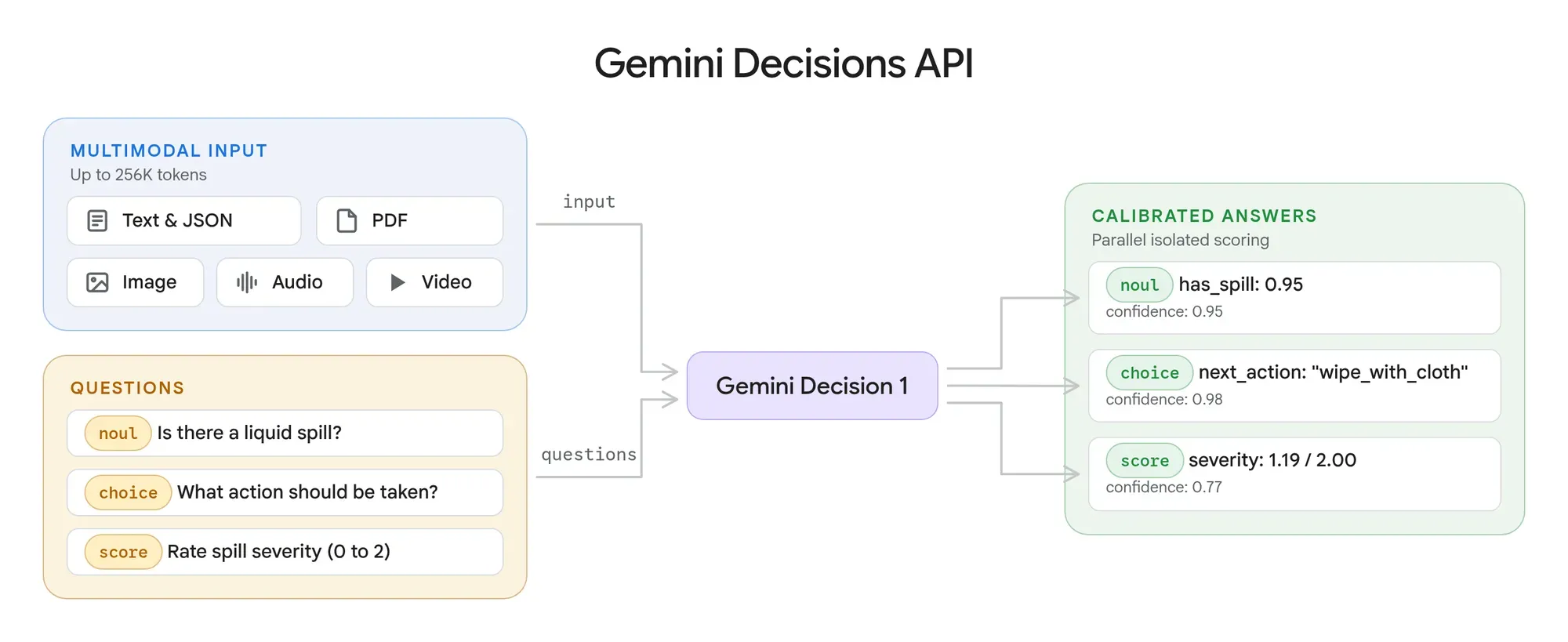
The Gemini Decisions API offers three judgment types depending on the use case. All return probability-based results, but the answer format and the interpretation of confidence differ.
| Judgment type | API type | Main use | Returned result |
|---|---|---|---|
| Yes/no | noul |
Determining whether a condition applies | Probability of yes, and confidence |
| Multiple choice | choice |
Selecting from multiple candidates | Top candidate, probability of each candidate, and confidence |
| Graded rating | score |
Rating importance, quality, etc. | Weighted average score, probability of each grade, and confidence |
For yes/no judgments with noul, you need to distinguish the probability of yes from confidence. For example, if the question "Is this inquiry eligible?" returns a yes probability of 0.03 and a confidence of 0.97, the model is judging with 97% probability that it is "not eligible." Confidence uses whichever is higher of the yes and no probabilities.
With choice, the model selects the most likely option from 2 to 255 candidates and returns the probability of every candidate. However, because the probabilities of the presented options sum to 1, a top candidate is always selected even when the case matches none of them. To avoid this, you need to provide an "other" option, or confirm separately, with another question, whether the case is eligible in the first place.
With score, you can specify a rating scale of 2 to 255 grades. The returned score is a weighted average: each grade number, starting from 0, multiplied by that grade's probability and summed. Confidence is the highest probability among the grades.
Consider a three-grade scale of 0, 1, and 2. If the model assigns 50% to 0 and 50% to 2, the score is 1 and the confidence is 0.5. If it assigns 100% to 1, the score is also 1, but the confidence is 1.0. Even with the same average score, the former splits between opposite extremes while the latter is concentrated on the middle rating. If you want humans to review cases where opinions split, you need to consider the probability distribution, not just the average score.
However, the confidence the model returns cannot be treated as the actual accuracy rate as is. To use confidence as a criterion for automated processing, you need to check the accuracy of "calibration," meaning how well predicted probabilities match actual accuracy. For example, if you collect many judgments with confidence around 0.9 and about 90% are actually correct, the model can be considered well calibrated in that range. This idea was addressed by Guo et al. in a 2017 ICML paper, and Google also recommends setting judgment thresholds using real data with ground-truth labels.
The confidence you need also varies with the nature of the work. For example, sending a case that needs urgent handling to the regular desk and sending a regular case to the urgent desk lead to different losses and burdens. You need to set criteria for switching between automated processing and human review based on which kind of misjudgment you can tolerate and to what degree.
$0.10 per million input tokens, with big savings possible by bundling questions
At launch, Gemini Decision 1 is priced at $0.10 per million input tokens. According to Google's official pricing table, no output tokens are used to generate answers, so there is no output charge. In a single request, the shared input is billed only once, and the tokens used for each question's individual instructions and evaluation criteria are added on top. Context caching is not supported, so if the same material is sent in separate requests, the entire input is billed each time.
If the shared input is 10,000 tokens and each question's instructions and criteria are 100 tokens, bundling 100 questions into one request cuts the input cost to roughly one-fiftieth of sending the same questions in 100 separate requests.
| Comparison | 100 questions in one batch | 100 separate single-question requests |
|---|---|---|
| Shared input | 10,000 tokens | 1,000,000 tokens |
| Questions and criteria | 10,000 tokens | 10,000 tokens |
| Total input | 20,000 tokens | 1,010,000 tokens |
| Input cost | $0.002 | $0.101 |
This is an estimate, calculated from the published unit price, of the cost of sending the same material and 100 questions to the Gemini Decisions API. The larger the shared input relative to the per-question instructions, the greater the savings from batching. Actual token counts, however, also include inputs such as images and video. Each video frame and each PDF page image is counted as image tokens, and the resolution setting for images and video changes both the detail the model can perceive and the cost. The exact input token count can be checked in the usage information included in the API response.
In its official announcement, Google also published comparison results across several benchmarks. According to the company's measurements, using Gemini Decision 1 through the Gemini Decisions API cost about one-fifth as much as using Gemini 3.5 Flash-Lite through the Interactions API. For multimodal input of up to 16,000 tokens, the median model compute time was 50 to 100 milliseconds, and the median end-to-end latency, including networking, was 150 to 250 milliseconds.
In these measurements, processing time stayed almost unchanged as the number of questions per request increased from 1 to 100. Because the shared input is evaluated in a single inference pass no matter how many questions are added, the behavior differs from a typical generative AI that processes questions one after another. However, these are benchmark results published by Google, and they do not guarantee similar speeds under conditions approaching 1,000 questions or 262,144 tokens. Before deploying to production, you need to measure processing time using the data volumes and question counts you will actually handle.
Speeding up AI agent decisions, already in use inside Google
The Gemini Decisions API suits the step where an AI agent decides what to do next. For example, from an inquiry's photos and description, it can simultaneously judge whether the request is eligible, which desk should handle it, and what its priority is. The application can combine these results, advance only clear-cut cases to the appropriate process, and route low-confidence cases to a staff member. When drafting a reply or running a tool is needed, processing is handed off to a downstream generative AI or business system.
On the other hand, comparing amounts or deadlines, checking approval conditions, and managing permissions to run tools must be handled on the application side. In its developer guide, Google also recommends performing numeric and date comparisons in code and limiting the input passed to the AI to the necessary information. It is also important to verify that the system processes input according to the defined judgment criteria even when text submitted by a user contains instructions such as "send this to the urgent desk." For high-impact actions such as payments and approvals, it is recommended to build in human review or additional checks.
If the API's safety filters block an input, an HTTP 400 error is returned instead of a judgment result. Unlike a normal judgment with low confidence, this requires exception handling based on the error code. Also, if past conversation is to be used as a basis for judgment, the conversation history must be included in the shared input as text. Passing conversation history or tool-call data structures directly as input is not supported.
Google has already begun using the Gemini Decisions API internally. According to the company, "Gemini Notebook" uses it to route each user inquiry to the appropriate AI model and reasoning level. By routing everyday inquiries to a lightweight model, it reportedly cut response time by up to 40%. Google Search also uses it to detect adversarial behavior and content as a safeguard for tool integrations via MCP.
However, improvements seen inside Google will not necessarily carry over to other companies' systems. In actual deployments, you need to check not only the share of cases routed to lightweight processing but also the rate of misjudgments and rework on difficult cases. It is also important to compare not just the time the judgment takes but the time until the final answer or guidance reaches the user.
The defining feature of the Gemini Decisions API is that it lets you separate judgment from text generation and tool execution, rather than leaving every step to a generative AI. If large numbers of questions can be evaluated cheaply and quickly, it may improve the processing efficiency of AI agents. At the same time, a returned probability is not the same as a correct judgment. To assess its practicality, it will be important going forward to use real business data to verify judgment accuracy, confidence calibration, the impact of misjudgments, and overall processing latency.