


On November 17, 2026, Google began offering Gemini's "Tasks" feature free in six countries, including Japan. When you give Gemini a job, it carries out multiple steps in the background and notifies you when, for example, a trip itinerary is ready or a flight price drops. In the US, Tasks also adds calling stores on your behalf, buying products with Google Pay, and creating tasks by forwarding text messages or emails. The purchasing feature offers two methods: reviewing the order and then approving payment, or specifying conditions such as the product and budget in advance and letting Gemini make the purchase. For calling and purchasing, the point at which the user must confirm or approve differs.
What you can do with Tasks, now free in Japan
The free rollout covers six countries: the US, Japan, South Korea, Canada, Australia and India. According to Google's announcement, the free version of Tasks uses "Gemini 4 Hydrogen." In Japan, it is available to users aged 18 and over who are signed in to a personal Google account with Gemini history turned on. Work and school accounts are not eligible, and standard tasks can be used from the Gemini app on mobile, Mac and the web. According to the Japanese help page, in some regions outside the free rollout, Google AI Pro or Ultra subscribers can still use the feature.
Google had announced this feature as "Gemini Spark" at Google I/O on May 19. At the time, the plan was to offer it first to testers and then as a beta to Google AI Ultra subscribers in the US. The ability to keep working in the background was there from the start; this update expands the regions and users who can use it for free. Even after the rename, tasks and schedules set up in Spark carry over. To request a new task, switch from "Chat" to "Tasks" in the Gemini input field.
Beyond producing a trip itinerary or research materials in a single request, you can hand off recurring work, such as summarizing your email and calendar every morning. The Gemini release notes also describe using it to monitor flight prices and notify you when they fall. In that case, Gemini handles the price research and notification, and you decide whether to actually buy.
In the US, you can review a call plan before Gemini dials
With the US phone-calling feature, you can have Gemini call stores to check tire stock or get a repair quote. It can call multiple stores in parallel and schedule calls to match each store's business hours. Before dialing, you can review and approve the call plan Gemini drafts. Because inquiries to several stores run in parallel, you don't have to wait for each line to connect one at a time.
Gemini tells the person who answers that it is an AI. Google's release notes say it does not share payment information or sensitive account information on calls. Josh Woodward, who introduced the repair-shop calling feature in the announcement blog, wrote that Gemini does not give out such information unless the user explicitly instructs it to. Stores can also set their lines to refuse calls from AI. After a call ends, you can see a summary and a full transcript in the chat. However, according to a footnote in the announcement blog, calling is unavailable in five states: Indiana, Louisiana, Minnesota, Montana and Nebraska.
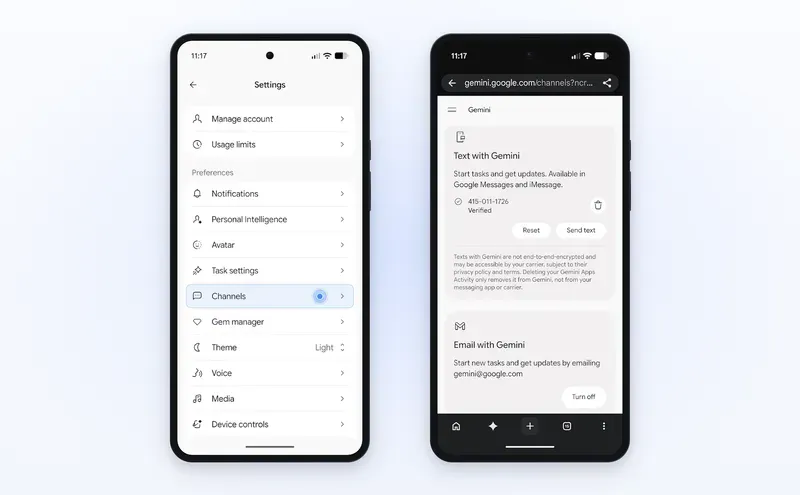
In the US, there are also more ways to request tasks. You can send requests by text message from Google Messages or iMessage, and replying in the same thread while Gemini is working lets you give additional instructions. For email, you can forward a message to request a task, and a link to view the result is sent back individually to the person who forwarded it. All of these are limited to US residents aged 18 and over using a personal Google account, and only English is supported. Using text messaging also requires a verified US phone number and a line from a supported carrier.
When do you approve payment in US purchases?
For purchase tasks using Google Pay, you specify candidate products or sellers when making the request, then set a budget cap and a deadline. You also need to confirm your payment method and shipping address. The budget can be set up to US$1,000, and the deadline within 14 days. If the purchase can't be made by the deadline, the task is canceled, and you can also cancel before payment is completed. According to Google's purchasing help, the feature is for users aged 18 and over in the US, who must be signed in to a personal Google account with Gemini history enabled. A payment method registered in Google Wallet is also required, and only English is supported.
Google's public materials describe the approval method differently. According to the purchasing help, "purchase confirmation" is on by default, and you get a notification when a purchase is ready. You review the order and pay with Google Pay. The same help page also describes turning off "purchase confirmation" when setting up a task, so that payment proceeds without further confirmation once your specified conditions are met.
| Google material | When payment is approved |
|---|---|
| November 17 release notes | You review the order details and explicitly approve payment before checkout, via a tap and an on-device confirmation. Does not mention turning off "purchase confirmation." |
| US purchasing help | Describes approving at order time, as well as turning off "purchase confirmation" when setting up the task. When off, payment goes through without reconfirmation once the specified conditions are met. |
| November 17 announcement blog | Mentions both confirming before pressing the buy button and approving the purchase in advance. |
Comparison of US purchasing procedures based on public materials as of November 18, 2026.
The Android and desktop versions of the purchasing help both describe the same setting. Google's announcement blog also mentions advance approval, but the public materials do not make clear which accounts or merchants it is available for.
Google says it adopted the "Agent Payments Protocol (AP2)" for this purchasing feature. AP2 records the actions a user has authorized an agent to take as digitally signed records, so the approvals can be checked later. Google Cloud's explanation of AP2 distinguishes between approving a purchase on the spot and specifying purchase conditions in advance for the agent to act on. In the former, you approve the actual items and price in the cart; in the latter, conditions such as a maximum amount and purchase timing are recorded, and the agent proceeds with the order when they are met. AP2 defines this approval mechanism, but Google's Gemini announcement does not explain the internal processing of individual transactions.
Payments also use digital tokens or virtual card numbers for supported cards, a mechanism for paying without handing the actual card number to the merchant. Google also says it plans to integrate the "Universal Commerce Protocol (UCP)" into Gemini.
When website control is handed back to the user
Google says Tasks runs in the cloud on "Agent Compute Engine." Each account is assigned a dedicated virtual machine, isolated from other users' environments by hardware. Gemini also has screening filters to keep malicious instructions embedded in search results or web pages from causing it to take unintended actions, and Google Safe Browsing is used to restrict the links it can access. Details of this execution infrastructure are explained in Google Cloud's announcement.
There are two ways to operate websites: connecting to Chrome on the user's computer, or using a separate browser in the cloud. According to the Japanese help page, when using Chrome on your computer, Gemini can also access websites you are already signed in to. With the cloud browser, work continues even after you close your device. If some sign-in steps or other actions require the user, Gemini pauses the work. Signing in with credentials stored in Google Password Manager also requires user confirmation.
When the cloud browser is used, browser data such as cookies, including login information, is saved for future sessions. Users can delete data saved from past sessions at any time, and Google may also delete it automatically.
Google says tasks may not always proceed as instructed and may fail to complete. Because the free features are being rolled out in stages, it is not clear when they will become available for each account in Japan, or whether the US-first features will be extended to Japan. For trip planning, for example, Gemini can handle researching options and notifying you of airfare drops, but when you actually book or buy on a travel site, you may have to perform the final steps yourself, depending on the site.