


On October 13, 2026, NVIDIA released "Preset C," a new setting that speeds up DLSS Frame Generation, in the beta version of the NVIDIA app. It supports GeForce RTX 40 and 50 series GPUs and replaces part of the process that estimates motion from preceding and following frames with a lighter algorithm. According to NVIDIA, it delivers up to a 35% speedup on the RTX 5060. NVIDIA also acknowledges a slight loss in image quality. What stands out about this update is that it raises the frame rate at the same generation multiplier, rather than by increasing the number of AI-generated frames. However, evaluating its effect properly requires looking beyond displayed fps to the game's native rendering performance and responsiveness to input.
How Preset C Speeds Up Frame Generation
DLSS Frame Generation inserts AI-generated images between the frames rendered by the game engine to make motion look smoother.
According to NVIDIA's official explanation, the existing Frame Generation and Multi Frame Generation use two AI models with different roles.
The first model uses motion vectors and depth information supplied by the game engine.
Motion vectors describe which direction, and how far, objects on screen have moved. Depth information indicates the distance from the camera to each object. Combining the two lets the model estimate how objects moved between two frames rendered by the game.
The second model directly compares the preceding and following images to calculate "optical flow," an estimate of apparent motion on screen.
This process fills in changes that the motion vectors from the game engine alone cannot capture.
For example, user interface (UI) elements overlaid on the screen, or changes in reflections and lighting caused by ray tracing, may not be accurately captured from the movement of objects in 3D space alone.
Optical flow, which estimates changes from the actual images, is therefore used to improve the accuracy of frame generation.
With Preset C, the second AI model that calculates this optical flow is replaced with a faster, lighter algorithm.
NVIDIA says this speeds up not only standard Frame Generation but also Multi Frame Generation and Dynamic Multi Frame Generation.
However, the specifics of how the new algorithm works have not been disclosed.
Optical flow processing is also an area NVIDIA has been optimizing for some time.
At the DLSS 4 announcement in 2025, NVIDIA explained that it had replaced optical flow, previously computed in hardware, with a more efficient AI model.
Preset C changes that AI model into an even lighter process. It is unclear, however, whether it has gone back to the earlier dedicated-hardware approach, or how much AI it still uses.
Because optical flow affects the quality of generated frames, making the process lighter may also change image quality.
NVIDIA itself explains that Preset C involves a slight compromise in image quality. However, it has not published comparisons showing in what scenes, or by how much, the difference appears.
Whether the impact on image quality is truly small will therefore need to be verified in actual games.
Up to 35% Faster on the RTX 5060, With the 6X Setting Going From 255fps to 348fps
To demonstrate the effect of Preset C, NVIDIA has published a performance comparison in Cyberpunk 2077 using a GeForce RTX 5060 8GB.
The official performance chart compares Preset A/B, which corresponds to the conventional Quality Mode, with Preset C, the new Performance Mode, at the same frame generation multipliers.
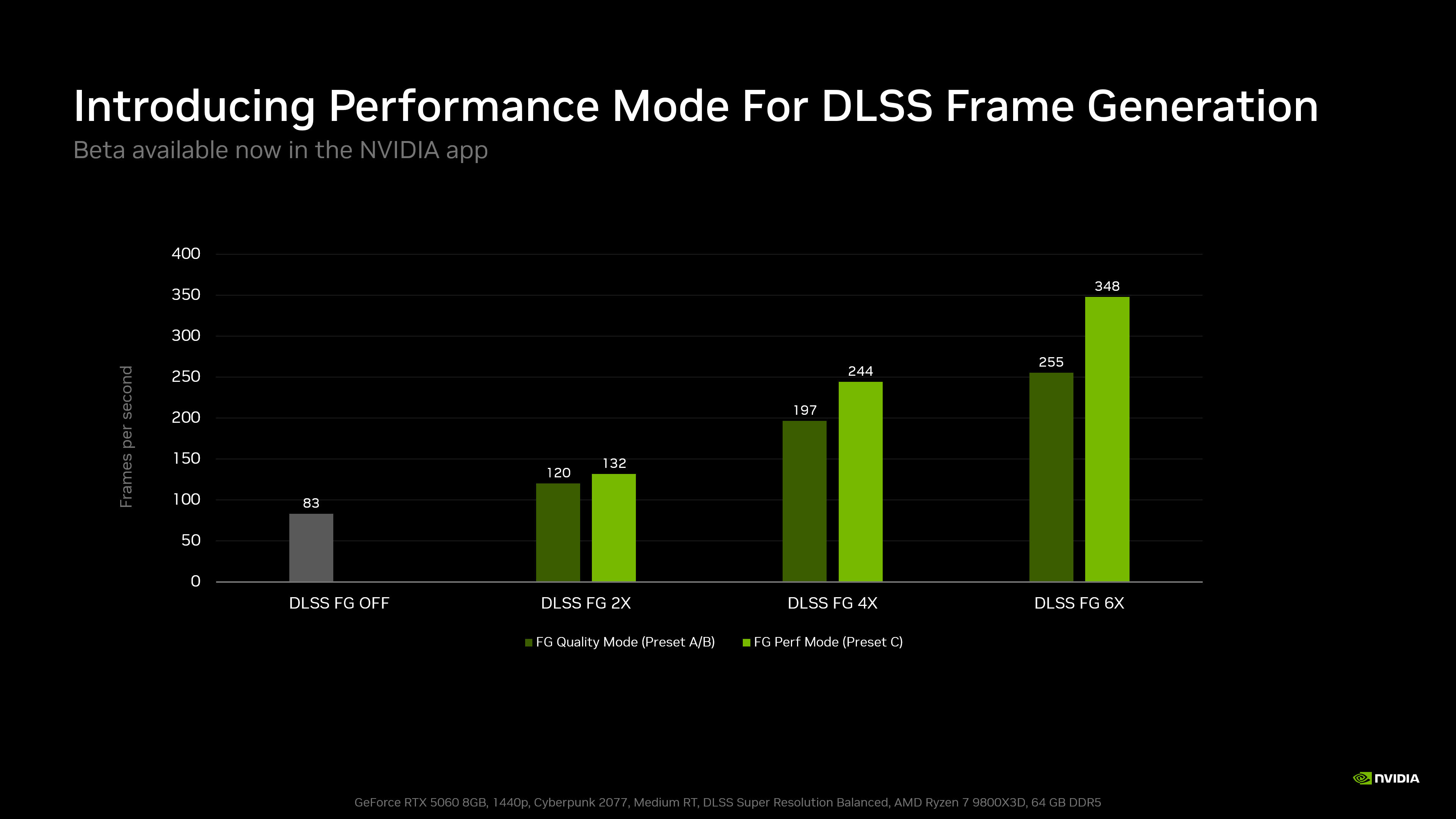
Calculating the rate of increase from the figures in the chart gives the following.
| Frame generation setting | Preset A/B | Preset C | Increase in displayed fps |
|---|---|---|---|
| Frame generation OFF | 83fps | N/A | N/A |
| 2X | 120fps | 132fps | 10.0% |
| 4X | 197fps | 244fps | 23.9% |
| 6X | 255fps | 348fps | 36.5% |
The test conditions were 1440p resolution, medium ray tracing, and DLSS Super Resolution in Balanced mode. The system used an AMD Ryzen 7 9800X3D CPU and 64GB of DDR5 memory.
The rates of increase were calculated from the figures in the chart NVIDIA published on October 13, 2026, using "(Preset C fps ÷ Preset A/B fps − 1) × 100" and rounded to one decimal place. They are not the result of our own measurements.
What stands out is that, at the same frame generation multiplier, switching to Preset C significantly raises displayed fps.
At the 2X setting, fps rises 10.0% from 120fps to 132fps, and at 4X it rises 23.9% from 197fps to 244fps.
At the 6X setting, fps increases from 255fps to 348fps, a gain of about 36.5%.
The stated figure in NVIDIA's announcement is "up to 35%," but calculating from the 255fps and 348fps in the chart gives about 36.5%. The official figure and the number calculated from the chart should be treated separately.
In any case, this is a result for a specific game setting on the RTX 5060, and the same performance gain will not necessarily be seen on every supported GPU or game.
It is also worth noting that this comparison does not hold image quality completely equal.
NVIDIA acknowledges that Preset C may slightly lower image quality compared with the existing settings.
Even if a large fps gain is confirmed at high multipliers, whether image quality can be maintained at a level that justifies that performance difference is a separate question.
Lower Frame Generation Load, but fps Gains and Input Latency Are Separate Issues
Frame generation uses GPU processing power to create the additional images, so frame generation itself requires a certain amount of processing time.
NVIDIA's Streamline DLSS Frame Generation documentation, published for developers, lists approximate processing times for frame generation.
For example, for 1440p frame generation on a GeForce RTX 5080, the figure is 2.04 milliseconds at the 2X setting and 3.61 milliseconds at 4X.
However, these are not measurements using Preset C, and the conditions differ from the RTX 5060 comparison here. NVIDIA also presents them only as reference values, since processing time varies with the game engine and implementation.
Still, they show that frame generation requires GPU processing time and that the load changes with the multiplier.
Even if the game's own rendering is fast, if generating the additional frames takes time, it can affect the pace at which the next frame is processed.
Preset C can be seen as an improvement that reduces this frame generation load.
In fact, in NVIDIA's measurements, displayed frame rate rises from 255fps to 348fps at the same 6X setting.
This is not the result of raising the multiplier of generated frames. By making the processing required for frame generation more efficient, more frames can be displayed even at the same setting as before.
However, the important point here is that displayed fps and the fps the game engine actually renders are different things.
With DLSS Frame Generation, AI-generated frames are displayed on screen in addition to the frames rendered by the game engine.
NVIDIA's Streamline documentation also explains how to calculate final output fps from the application's native frame rate and the number of frames actually displayed per rendered frame.
In other words, even if frame generation increases displayed fps, the game's internal simulation and input processing do not speed up at the same rate.
For example, even if Preset C can display 348fps, that does not necessarily mean you get the same input responsiveness as running the game at 348fps with conventional rendering alone.
If optical flow processing becomes lighter, overall GPU load may fall, which could positively affect the game's native rendering performance and latency. But the chart NVIDIA published this time does not measure these metrics.
DLSS Frame Generation also incorporates "NVIDIA Reflex," which reduces system-wide latency.
Streamline requires Reflex integration when using DLSS Frame Generation, but that does not reveal how many milliseconds of input latency Preset C itself improves.
To judge the effect of Preset C comprehensively, it will be necessary to measure actual input latency and frame pacing as well as displayed fps.
RTX 40 Series Supported, but 6X Frame Generation Is Not Available
Preset C is available on both the GeForce RTX 40 series and the RTX 50 series.
However, support for Preset C does not mean that Multi Frame Generation or 6X frame generation becomes available on the RTX 40 series.
The RTX 40 series can use standard Frame Generation, while Multi Frame Generation, which generates multiple frames, and Dynamic Multi Frame Generation, which adjusts the generation multiplier dynamically, are features for the RTX 50 series.
NVIDIA also explains in its DLSS 4.5 feature overview that dynamic frame generation control and frame generation of up to 6X are for the RTX 50 series.
On the RTX 40 series, then, Preset C would be used to lighten the supported standard frame generation.
The performance chart this time also does not include RTX 40 series results.
The 10.0% increase in displayed fps at the 2X setting on the RTX 5060 does not necessarily mean the RTX 40 series will see the same improvement.
The effect of the lighter processing may vary not only with GPU generation and performance but also with resolution and the game's processing load.
Another point to keep in mind is the difference between DLSS Super Resolution settings and frame generation settings.
Preset C is solely a setting for the model used in frame generation; it does not switch DLSS Super Resolution to Performance mode.
NVIDIA's official chart also compares frame generation Preset A/B and Preset C with Super Resolution fixed at Balanced mode.
Steps to Enable Preset C
NVIDIA's instructions for the setting are as follows.
- Update the NVIDIA app to the latest version and enable "Opt in to access Beta or experimental features" under "About" in "Settings." Once the beta update has downloaded, follow the on-screen instructions to install it.
- Open "Graphics" in the NVIDIA app and select a supported game. To apply the setting to all supported games, choose "Global Settings."
- Open "DLSS Override - Model Presets" under "Driver Settings" and select "Custom."
- From the "Frame Generation" drop-down menu, select "Preset C" and click "Apply." If Preset C does not appear, restart your PC as directed by NVIDIA.
Note that this setting is available only in games that support frame generation and DLSS Override.
It cannot add frame generation to games that do not support it.
A good approach is to apply Preset C game by game and compare it with the existing setting.
Compare Image Quality and Responsiveness, Then Choose the Setting That Suits Your System
Before Preset C, DLSS 4.5 had already improved frame generation image quality with the existing Preset B.
Preset B receives additional UI information from supported games, allowing it to reproduce minimaps and on-screen elements more accurately.
In other words, frame generation quality depends not only on the performance of the AI model but also on the information supplied by the game engine.
NVIDIA explains that for Preset C it replaced the model handling optical flow with a lighter algorithm, but it has not said how the existing UI-related processing has specifically changed.
It is therefore not possible to conclude that minimaps will necessarily break up or that reflections will necessarily show ghosting.
For an actual comparison, it is best to fix the DLSS Super Resolution and frame generation multiplier in the same scene of the same game, then switch only between Preset A/B and Preset C.
Beyond the difference in displayed fps, pay attention to the UI when moving the camera, the outlines of thin objects, and changes in reflections and lighting.
Even when differences are hard to see in still images, quality differences in generated frames can become visible in motion.
Responsiveness to mouse and controller input is also an important point of comparison.
Of course, the need to check these points does not mean that Preset C has been confirmed to cause specific image quality problems or worse input latency.
What NVIDIA has shown this time is the possibility of raising displayed frame rates without replacing your GPU, by making the processing required for frame generation more efficient.
Once independent testing covers a wide range of GPUs, including the RTX 40 series, and the effects on image quality and input latency at the same generation multiplier become clear, it will be easier to decide in which environments to use Preset C.
If it can raise displayed fps while sufficiently preserving image quality and responsiveness, it could be a useful option for getting more out of existing GPUs.