


Apple has officially released iOS 18, the latest operating system for iPhone. This new version comes packed with numerous new features, including significantly improved user interface customization and enhanced privacy features. It's available on a wide range of devices, from the iPhone XR to the latest iPhone 16 Pro Max.
Devices Compatible with iOS 18
iOS 18 is compatible with all the same iPhone models as iOS 17. Here's the full list of supported devices:
- iPhone XR, iPhone XS and XS Max
- iPhone 11, iPhone 11 Pro and 11 Pro Max
- iPhone 12 and 12 mini
- iPhone 12 Pro and 12 Pro Max
- iPhone 13 and 13 mini
- iPhone 13 Pro and 13 Pro Max
- iPhone 14 and 14 Plus
- iPhone 14 Pro and 14 Pro Max
- iPhone 15 and 15 Plus
- iPhone 15 Pro and 15 Pro Max
- iPhone 16 and 16 Plus
- iPhone 16 Pro and Pro Max
- iPhone SE (2nd generation)
- iPhone SE (3rd generation)
How to Update to iOS 18
To update to iOS 18, open the Settings app, tap "General," then tap "Software Update." If the update doesn't appear right away, keep checking over the next few hours, as it may take some time to reach your iPhone. Once you install the update, your iPhone will restart and display a more detailed tutorial.
Home Screen Customization Features
One of the most notable new features in iOS 18 is greatly improved home screen customization. For the first time, users can freely arrange app icons and widgets. This makes it possible to create blank spaces and have complete control over icon placement.
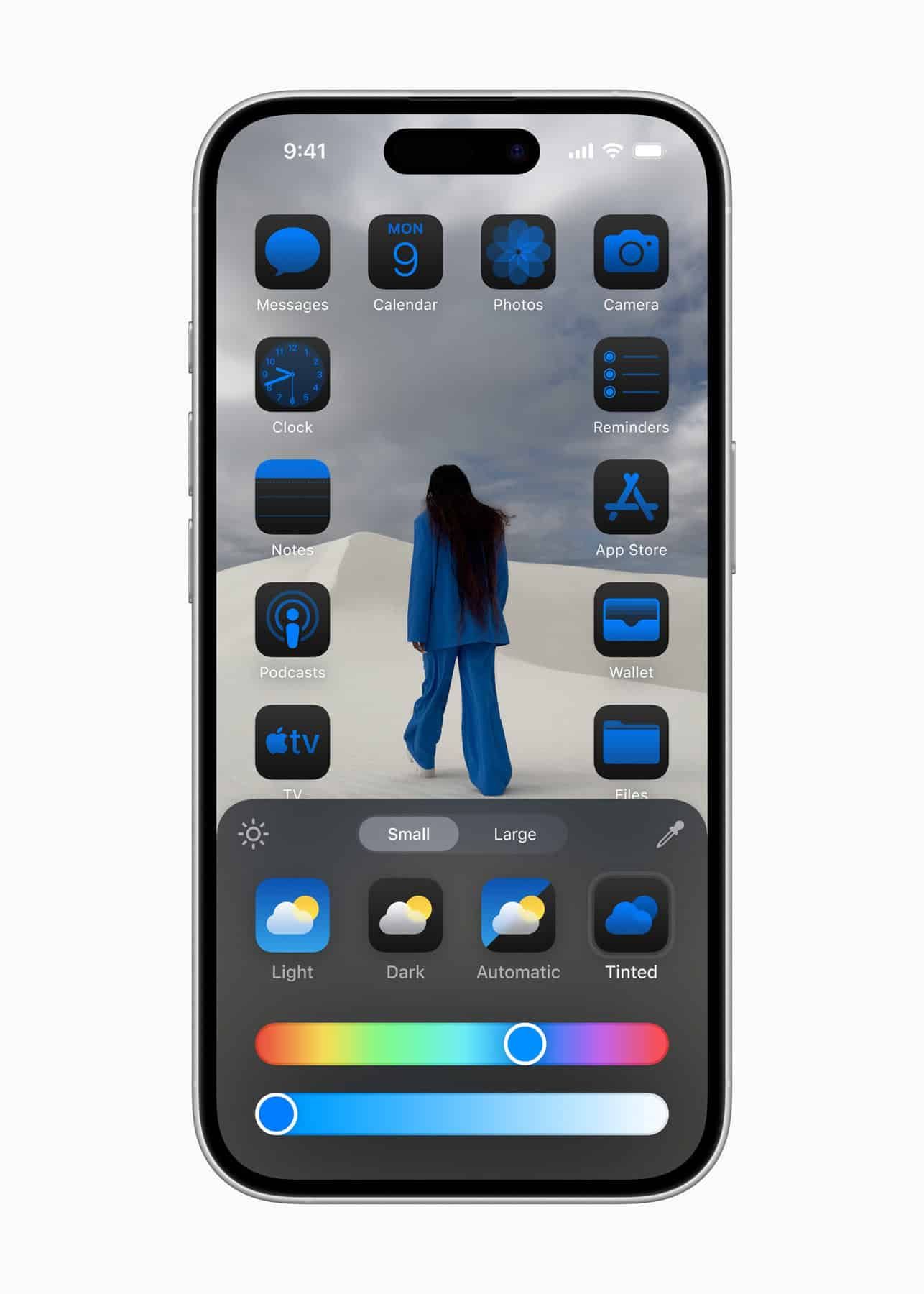
In addition, a new feature has been added that lets users apply custom colors to home screen app icons and widgets. Users can either select their preferred color or choose the new dark mode setting to switch most app icons on the home screen—including third-party apps—to a dark theme.
A new setting has also been added that displays app icons and widgets in a larger size. Enabling this setting hides app and widget names, creating a more visually-focused interface.
iPhone Mirroring
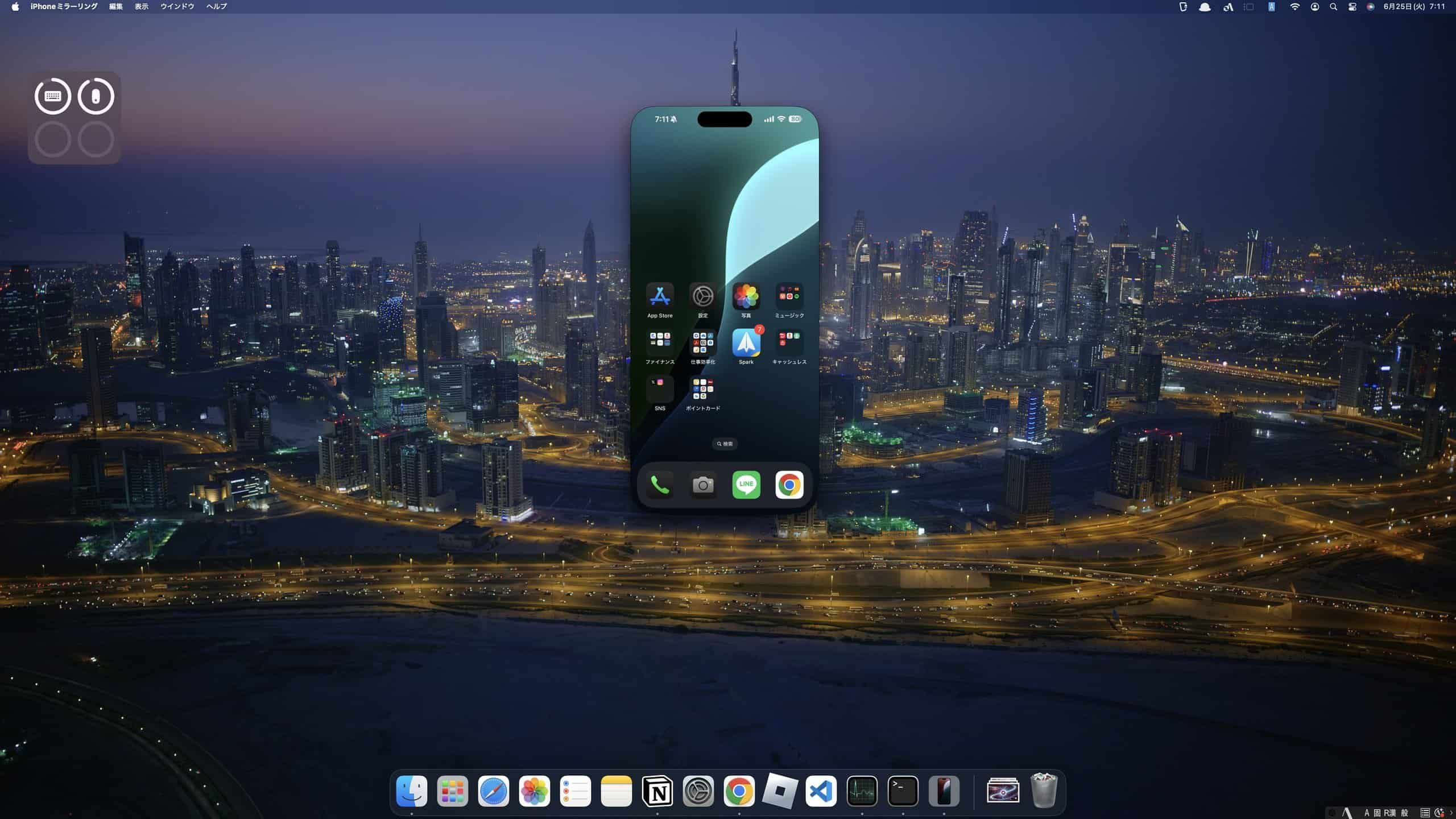
iOS 18 and macOS Sequoia introduce a powerful new feature called iPhone Mirroring (Japanese), which lets you control your iPhone directly from a Mac. Even while your iPhone is locked, launching the "iPhone Mirroring" app on your Mac establishes a connection between the two devices with a single click, allowing full control of the iPhone from the Mac's interface. Once iPhone Mirroring is set up, your Mac will also receive iPhone notifications, and clicking on a notification can automatically launch the iPhone Mirroring feature.
New Safari Features
iOS 18 adds a new Highlights feature to Safari. According to Apple, it uses machine learning to surface important information from the web page you're visiting.
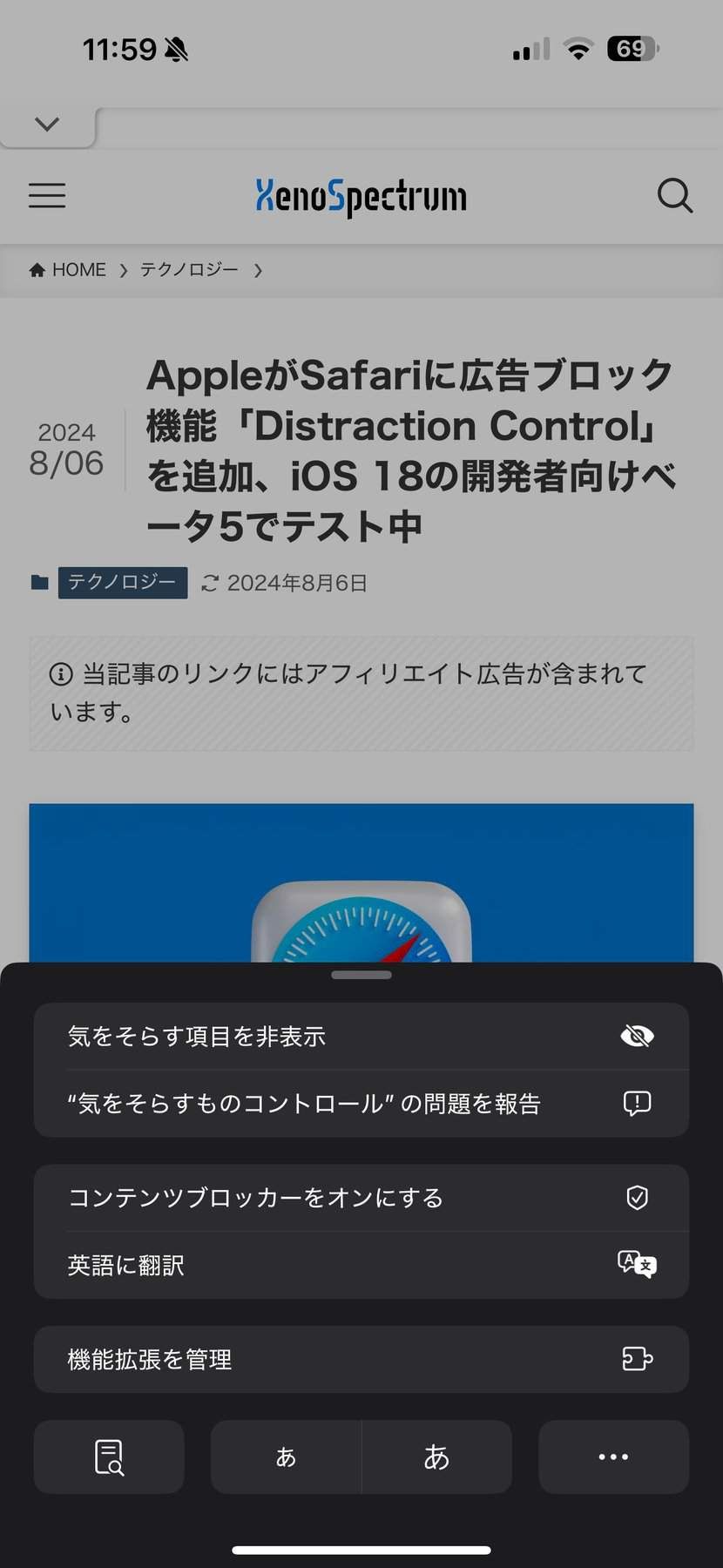
iOS 18 also adds a new "Distraction Control (Japanese)" feature to Safari. This feature gives users more freedom to control their web browsing experience by making it easy to block specific elements on a web page, such as sign-in pop-ups or other content overlays.
New Features in the Messages App
iOS 18 also brings numerous new features to the Messages app. Notably, users can now apply text effects to specific words within a message. Effects such as "big," "small," "shake," "nod," "explode," "ripple," "bloom," and "jitter" add visual flair to conversations.
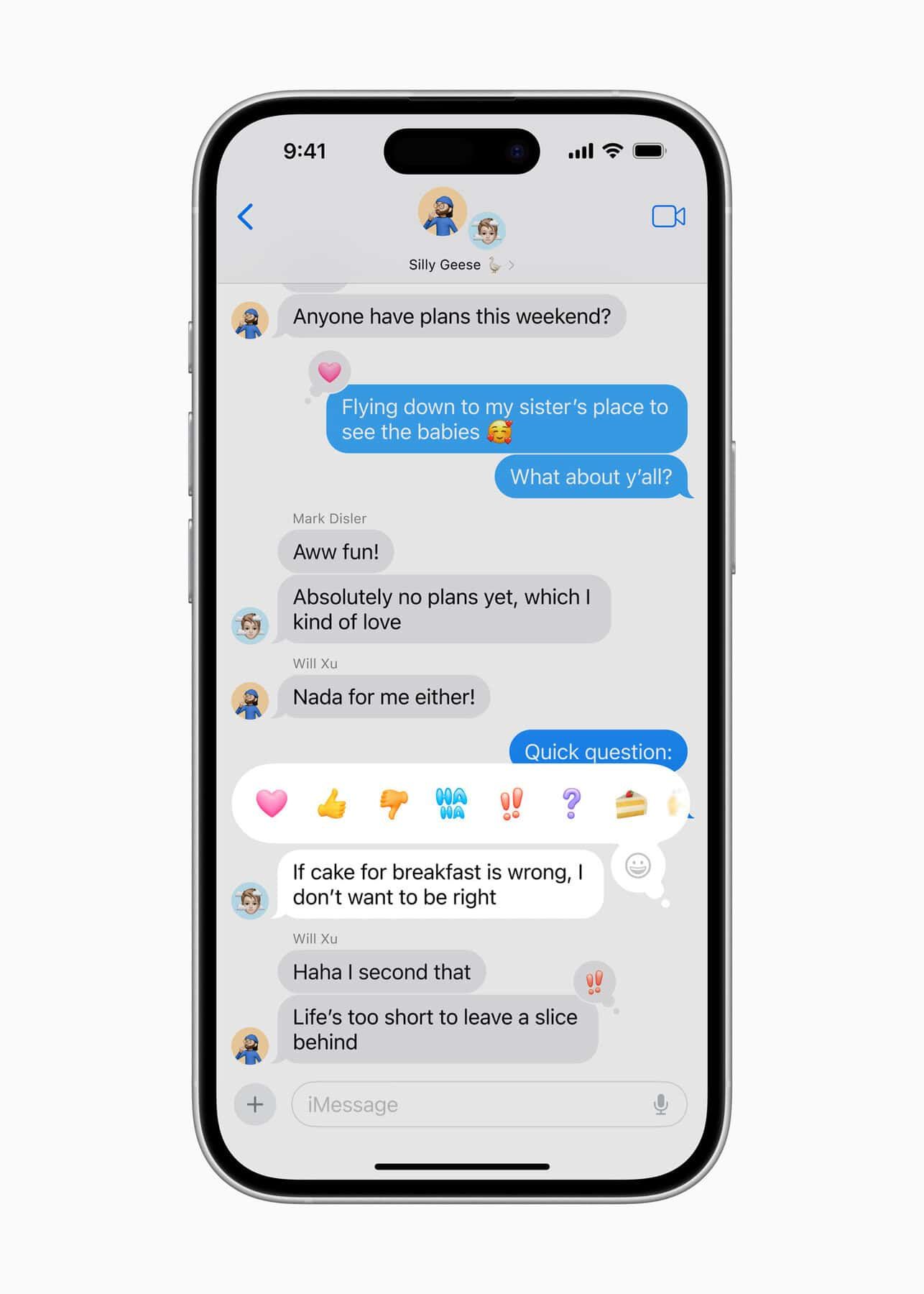
Additionally, users can now apply formatting such as bold, underline, italics, and strikethrough to any character, word, or phrase within iMessage.
The Tapback system has also been significantly overhauled, allowing users to react to messages with a wide range of emoji and stickers instead of being limited to the traditional Apple-approved options.
A scheduled message-sending feature has also been introduced. Users can compose a message and set it to be sent at a specific time—handy for sending messages when the recipient is more likely to be awake.
Furthermore, iOS 18 introduces support for RCS (Rich Communication Services) messaging for the first time. RCS improves cross-platform communication between iPhone and Android devices, enabling read receipts, typing indicators, improved group chats, and the ability to send high-quality photos and videos.
Control Center Overhaul
Control Center has been significantly overhauled in iOS 18. Users can now create a Control Center with multiple pages and swipe to access each one.
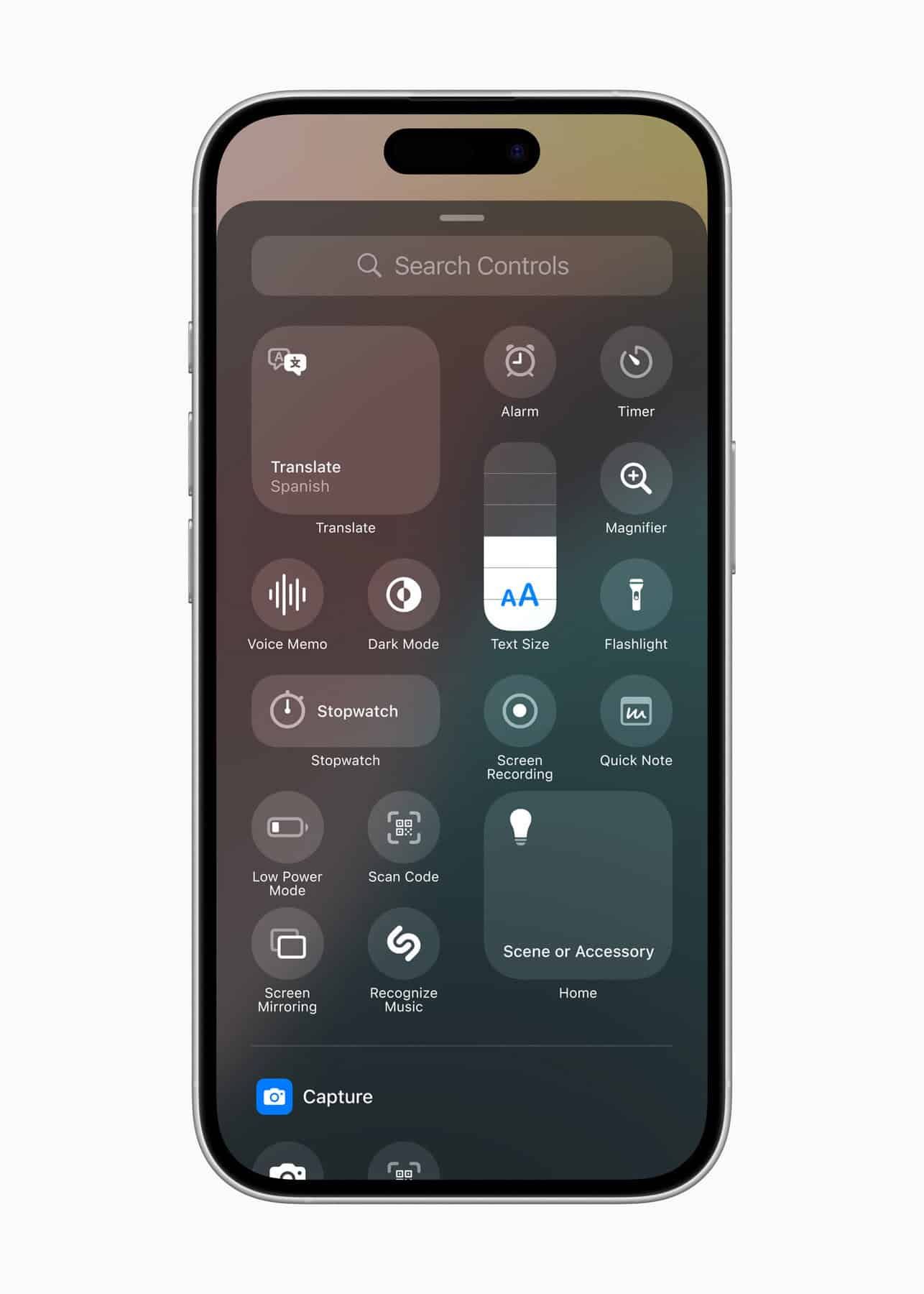
Apple has also introduced new APIs that let third-party apps add controls to Control Center. For example, the Ford app will let users start their vehicle or open the trunk directly from Control Center.
Lock Screen controls are now customizable too. Instead of being limited to the traditional flashlight and camera buttons, users can swap them out for new Control Center controls—including those provided by third-party apps.
These controls can also be assigned to the Action Button on the iPhone 15 Pro and iPhone 16, giving quick access to favorite functions without having to unlock the device.
Major Redesign of the Photos App
The Photos app has been extensively redesigned in iOS 18, which Apple describes as "the biggest update to Photos ever." The tabs at the bottom of the previous app have been removed in favor of a streamlined, unified layout that consolidates everything into a single view.
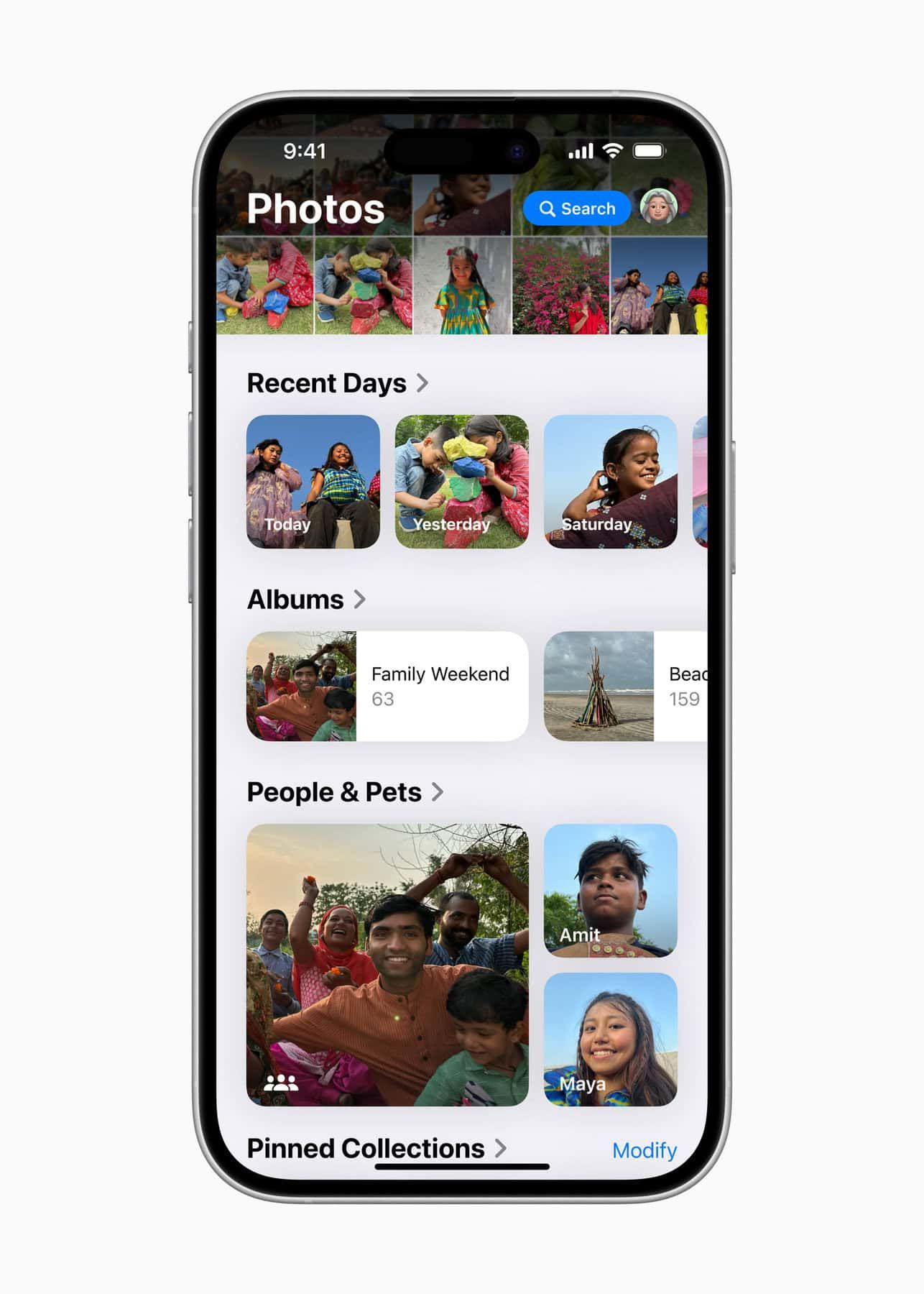
A key feature of the new Photos app is the introduction of Collections. Apple has organized the library by theme, letting users browse categories such as "Recent Days," "People & Pets," and "Trips." Photos can now also be viewed on a map.
The redesigned app also offers a variety of customization options, such as reordering and pinning different collections, and filtering out specific types of content, like screenshots.
The search function within the Photos app has also been completely overhauled in iOS 18. Users can now combine searches by people, places, and other criteria, making it easier than ever to find a specific photo.
Perhaps most significantly, the layout of the Photos app is now fully customizable—users can reorder sections or hide the ones they don't want to see.
Enhanced Privacy and Security
iOS 18 introduces several new features that strengthen privacy and security for iPhone users. One notable addition is the ability to lock any app with Face ID, Touch ID, or a passcode (Japanese). This means an app cannot be accessed without authentication, providing an extra layer of security for sensitive or personal information.
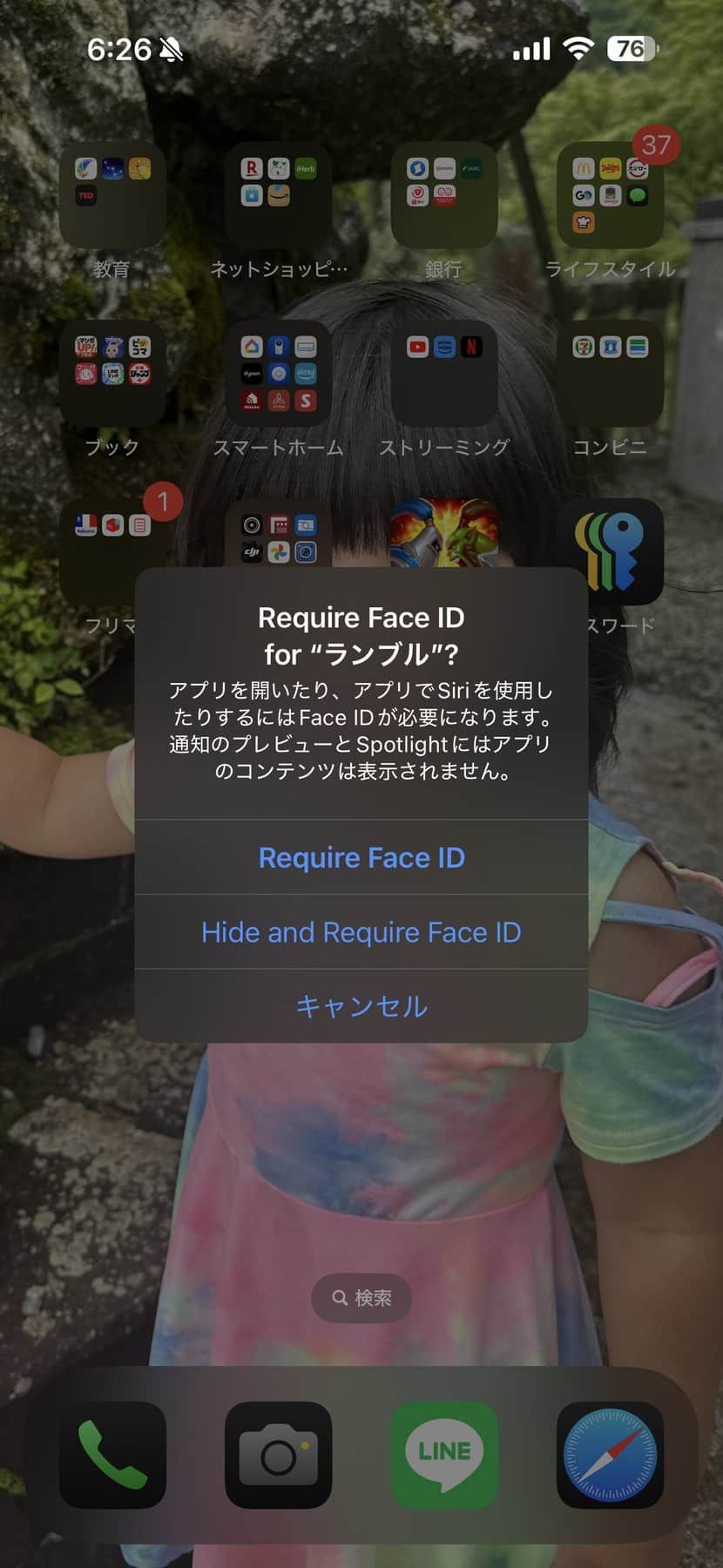
Additionally, iOS 18 now supports hidden apps. When an app is hidden, its name and icon no longer appear on the home screen or in search results, and notifications from it are no longer received. Instead, the app can only be accessed through a dedicated Hidden apps folder within the App Library. Opening a hidden app requires authentication via Face ID, Touch ID, or passcode.
Other privacy improvements include:
- Improved contact sharing: Instead of granting an app access to all your contacts, you can now choose which specific contacts to share.
- Accessory Setup Kit: A new way to pair Bluetooth accessories without giving the app visibility into other devices on your network.
- Settings app changes: The Privacy & Security interface in the Settings app has been redesigned, making it easier to manage what information you're sharing with apps.
Other Notable Features
iOS 18 includes many other new features and improvements beyond those mentioned above. Here's a summary of the key ones:
- Passwords app: A dedicated app for managing and storing passwords, passkeys, Sign in with Apple details, Wi-Fi passwords, and verification codes.
- Apple Maps: Users can now view topographic maps and hiking routes for U.S. national parks, create and save custom walking and hiking routes, and get turn-by-turn navigation.
- Journal app: New features let users log their mood and state of mind directly, track journaling goals with a new "Insights" feature, and use new widgets for the home screen and Lock Screen.
- Phone app: New additions include call recording (which notifies both parties that the call is being recorded), keypad search with T9 dialing support, call history search, and automatic microphone mode selection.
- Calendar app: The month view has been redesigned to make it easier to see upcoming events at a glance. Users can now create, view, edit, and complete reminders directly from the Reminders app.
- Game Mode: Minimizes background activity to maintain consistently high frame rates even during hours of continuous play. It also significantly reduces audio latency with AirPods and improves the responsiveness of wireless game controllers.
- Apple Wallet: With the Tap to Cash feature, users can instantly send money just by bringing their iPhone close to a friend's. The event ticket display has also been greatly improved, letting users check venue maps, parking details, and seat-side food delivery services right at their fingertips.
- Accessibility: Numerous new features have been added, including eye tracking for device control, a feature that converts music into vibrations and textures, vocal shortcuts for Siri, and a feature to reduce motion sickness in vehicles.
Xenospectrum's Take
iOS 18 can be seen as an ambitious update that pushes Apple's long-standing philosophy of user experience even further. In particular, the improved home screen customization deserves credit for making it easier for users to reflect their personality, turning the iPhone into a device that feels more uniquely their own.
The enhanced privacy and security features are also a timely update, given the growing importance of protecting personal information in the digital age. The app-locking and hiding features fit well with modern lifestyles where devices are increasingly shared with others.
On the other hand, the lack of AI-related features feels somewhat underwhelming. While Apple's cautious approach is understandable amid competitors rushing to integrate AI functionality, it does fall short of some user expectations in this regard.
Overall, iOS 18 is an update that offers existing iPhone users a fresh experience while holding the potential to attract new users as well. Here's hoping AI features will be added in future minor updates.
Source